Ga door naar hoofdinhoud
Word lid van de reparatiegemeenschap - Account aanmaken

Xbox One Elite Controller (Model 1698) Disassembly

Wat je nodig hebt

  1. Xbox One Elite Controller (Model 1698) Disassembly, Show me the Screws!: stap 1, afbeelding 1 van 2 Xbox One Elite Controller (Model 1698) Disassembly, Show me the Screws!: stap 1, afbeelding 2 van 2
    • You can remove the side panels with a pry tool.

    • You don't need to remove the rubber. The rubber on this controller was already bad.

    Vraag FixBot

    Voeg opmerking toe

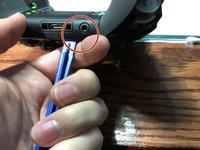
  2. Xbox One Elite Controller (Model 1698) Disassembly, Removing the back panel screws: stap 2, afbeelding 1 van 1
    • Remove the 5 Torx Security Bit (TR9) screws.

    Vraag FixBot

    Voeg opmerking toe

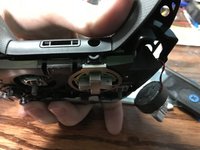
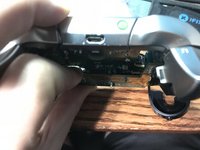
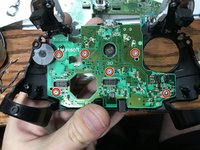
  3. Xbox One Elite Controller (Model 1698) Disassembly, Popping that back panel off: stap 3, afbeelding 1 van 3 Xbox One Elite Controller (Model 1698) Disassembly, Popping that back panel off: stap 3, afbeelding 2 van 3 Xbox One Elite Controller (Model 1698) Disassembly, Popping that back panel off: stap 3, afbeelding 3 van 3
    • Pry the panel next to the 3.5mm port.

    • Be careful to not rip the ribbon shown in the next step.

    Vraag FixBot
    Voeg opmerking toe

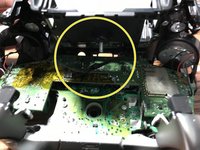
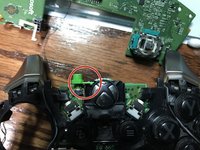
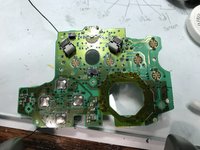
  4. Xbox One Elite Controller (Model 1698) Disassembly, Warning Carefully remove the ribbon: stap 4, afbeelding 1 van 2 Xbox One Elite Controller (Model 1698) Disassembly, Warning Carefully remove the ribbon: stap 4, afbeelding 2 van 2
    • Be careful to not rip the ribbon cable.

    • You can pop the connector up to remove the ribbon easily.

    • Ribbon Cable

    Vraag FixBot
    Voeg opmerking toe

  5. Xbox One Elite Controller (Model 1698) Disassembly, Screws on controller motherboard: stap 5, afbeelding 1 van 1
    • Remove the 2 Torx (T6) screws.

    Vraag FixBot

    Voeg opmerking toe

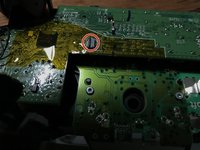
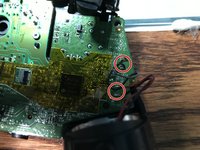
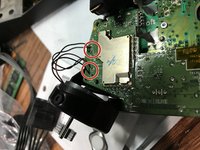
  6. Xbox One Elite Controller (Model 1698) Disassembly, Desolder wires from motherboard: stap 6, afbeelding 1 van 2 Xbox One Elite Controller (Model 1698) Disassembly, Desolder wires from motherboard: stap 6, afbeelding 2 van 2
    • Desolder the 4 wires on each side, these control the vibrations and the RT LT.

    Vraag FixBot

    Voeg opmerking toe

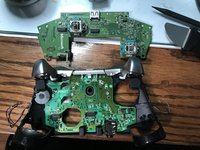
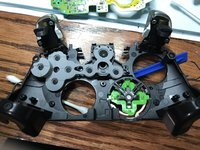
  7. Xbox One Elite Controller (Model 1698) Disassembly, Remove the motherboard: stap 7, afbeelding 1 van 2 Xbox One Elite Controller (Model 1698) Disassembly, Remove the motherboard: stap 7, afbeelding 2 van 2
    • Pull up from the "top" side of the controller on the daughterboard.

    Vraag FixBot
    Voeg opmerking toe

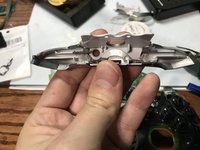
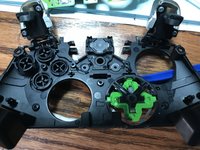
  8. Xbox One Elite Controller (Model 1698) Disassembly, Remove the Home Button Cover: stap 8, afbeelding 1 van 3 Xbox One Elite Controller (Model 1698) Disassembly, Remove the Home Button Cover: stap 8, afbeelding 2 van 3 Xbox One Elite Controller (Model 1698) Disassembly, Remove the Home Button Cover: stap 8, afbeelding 3 van 3
    • Be Careful to not lose the sync button.

    • Pry the middle section up from the home button side.

    • This will also remove the LB and RB which is a single part.

    Vraag FixBot
    Voeg opmerking toe

  9. Xbox One Elite Controller (Model 1698) Disassembly, Remove the controller daughterboard: stap 9, afbeelding 1 van 2 Xbox One Elite Controller (Model 1698) Disassembly, Remove the controller daughterboard: stap 9, afbeelding 2 van 2
    • Unscrew the 6 Torx (T6) screws.

    Vraag FixBot

    Voeg opmerking toe

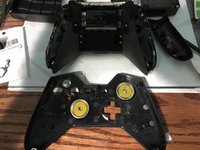
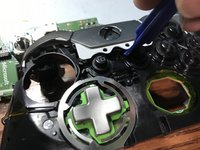
  10. Xbox One Elite Controller (Model 1698) Disassembly, Xbox One Elite Controller (Model 1698) Disassembly: stap 10, afbeelding 1 van 2 Xbox One Elite Controller (Model 1698) Disassembly, Xbox One Elite Controller (Model 1698) Disassembly: stap 10, afbeelding 2 van 2
    • Now you can remove the buttons themselves.

    Vraag FixBot

    Voeg opmerking toe

Conclusie

To reassemble your device, follow these instructions in reverse order.

Annuleren: ik heb deze handleiding niet afgemaakt.

45 andere personen hebben deze handleiding voltooid.

EasyAsABC123

Lid sinds: 01/22/10

2.557 Reputatie

5 handleidingen geschreven

14Gids Commentaar

Is there any way I could just do step 8, removing the Home cover? I simply need to fix my USB port so i dont really wanna take it completely apart just for that.

jones_8515 - Antwoord Deel

Desoldering the rumble motors isn't necessary, nor is removing the first motherboard. Once you get that back panel off, you're golden.

J'Anthony Joseph - Antwoord Deel

Ya hi i opened my controller and right away i don’t see ether bolt in both handles. 4 i believe to top two bottom.

Suggestions please.

Craig Amyotte - Antwoord Deel

I found using a TQ5 for the 2 motherboard screws worked the best on my controller not a T6

Mat - Antwoord Deel

Thanks for the info

EasyAsABC123 - Antwoord Deel

Voeg opmerking toe

Weergavestatistieken:

Afgelopen 24 uren: 21

Afgelopen 7 dagen: 59

Afgelopen 30 dagen: 282

Altijd: 104,853