Inleiding
Using this guide, you will be able to remove a broken battery from the Vizio CT15 in order to replace it with a new one.
Wat je nodig hebt
-
-
Turn the laptop off and remove all power cables.
-
Remove the six Phillips #0 screws.
-
Pull the back cover off.
 Vraag FixBot
-
-
-
-
Use the plastic opening tool or your fingers to pry the battery up and pull it from the laptop.
-


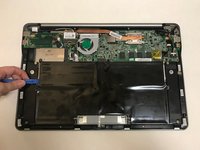
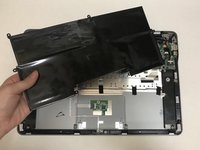
To reassemble your device, follow these instructions in reverse order.
Annuleren: ik heb deze handleiding niet afgemaakt.
2 andere personen hebben deze handleiding voltooid.

Team

University of North Texas, Team S1-G2, Thompson Spring 2018 Lid van University of North Texas, Team S1-G2, Thompson Spring 2018
UNT-THOMPSON-S18S1G2
4 Leden
12 handleidingen geschreven
1Gids Commentaar
In case anyone comes across this page looking for the CMOS Battery, it is an ML1220 Battery. I found a comparable replacement of "LeFix ML1220 Rechargeable CMOS Battery Replacement Compatible with ASUS EEE PC 1101HA 1005HA T101MT 1101HAB 1005P,Acer Aspire 5920 5920G 5920 G Series,Fujitsu Amilo Pi 3560 3660 LI3710 LI3910" on Amazon (https://www.amazon.com/LeFix-Rechargeabl...)
