Ga door naar hoofdinhoud
Word lid van de reparatiegemeenschap - Account aanmaken

VTech Record and Learn KidiStudio Microphone Replacement

Wat je nodig hebt

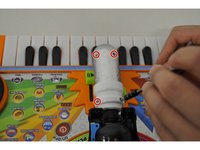
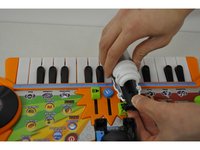
    1. VTech Record and Learn KidiStudio Microphone Replacement, Microphone: stap 1, afbeelding 1 van 2 VTech Record and Learn KidiStudio Microphone Replacement, Microphone: stap 1, afbeelding 2 van 2
      • Remove all four screws (7 mm) using PH2.

      • Remove black microphone base cover from the device.

      • Remove the batteries from the toy before beginning replacement of the microphone.

      Vraag FixBot

      Voeg opmerking toe

    2. VTech Record and Learn KidiStudio Microphone Replacement: stap 2, afbeelding 1 van 1
      • Remove the silver microphone component from the black base.

      Vraag FixBot

      Voeg opmerking toe

    3. VTech Record and Learn KidiStudio Microphone Replacement: stap 3, afbeelding 1 van 2 VTech Record and Learn KidiStudio Microphone Replacement: stap 3, afbeelding 2 van 2
      • Unscrew 4 PH2 screws (7 mm) from the silver microphone component.

      • Open the silver microphone housing and remove the actual microphone from the device.

      Vraag FixBot

      Voeg opmerking toe

    4. VTech Record and Learn KidiStudio Microphone Replacement: stap 4, afbeelding 1 van 1
      • Install new microphone in the device like shown.

      Vraag FixBot

      Voeg opmerking toe

Conclusie

To reassemble your device, follow these instructions in reverse order.

Annuleren: ik heb deze handleiding niet afgemaakt.

Shaina Carbonel

Lid sinds: 02/01/16

537 Reputatie

5 handleidingen geschreven

Team

UW Tacoma, Team 1-1, Rose Winter 2016 Lid van UW Tacoma, Team 1-1, Rose Winter 2016

UWT-ROSE-W16S1G1

5 Leden

10 handleidingen geschreven

1Gids Commentaar

What type of microphone? Where do u get the replacement

Tika S - Antwoord Deel

Voeg opmerking toe

Weergavestatistieken:

Afgelopen 24 uren: 0

Afgelopen 7 dagen: 11

Afgelopen 30 dagen: 37

Altijd: 1,053