Deze vertaling is door een computer gegenereerd en is nog niet door iemand nagekeken. Spreek je deze taal? Bekijk het hier.
Inleiding
De voorste knoppen van de Turtle Beach Stealth Ultra-controller (modelnummer TBS-0710-05) zijn essentieel voor de bruikbaarheid van de controller. Ze zijn verantwoordelijk voor het registreren van gebruikersinvoer en het doorsturen daarvan naar de spelconsole. Om ze te vervangen, moet je eerst de controller uit elkaar halen. Wees hierbij voorzichtig dat je het scherm of het moederbord niet beschadigt. Volg deze stappen om het probleem op te lossen.
Aanvullende bronnen:
Ondersteuningspagina voor de Stealth Ultra-controller
Video over het uit elkaar halen en in elkaar zetten van de Turtle Beach Stealth Ultra
Wat je nodig hebt
-
-
-
Gebruik een pincet om de rubberen stukjes voor de schroeven eruit te trekken.
 Vraag FixBot
-
-
-
Verwijder de 10 mm schroeven met een Phillips #00-kruiskopschroevendraaier.
-
-
-
Verwijder de sticker op de achterkant van de plaat.
-
Verwijder de 10 mm schroeven van de achterplaat met een Phillips #00 kruiskopschroevendraaier.
-
-
-
Gebruik een iFixit-openingsgereedschap om de plaat van de voorknop en de plaat van de analoge stick los te wrikken.
-
Gebruik een Phillips #00-kruiskopschroevendraaier om de schroeven van de voorplaat aan beide kanten van de controller te verwijderen.
-
-
-
-
Gebruik een Openingsgereedschap om de voorplaat los te maken van de achterkant.
-
-
-
-
-
Gebruik een Phillips #00 kruiskopschroevendraaier om de 10 mm schroeven te verwijderen die de handgrepen met de omlijsting van de controller verbinden.
-
-
-
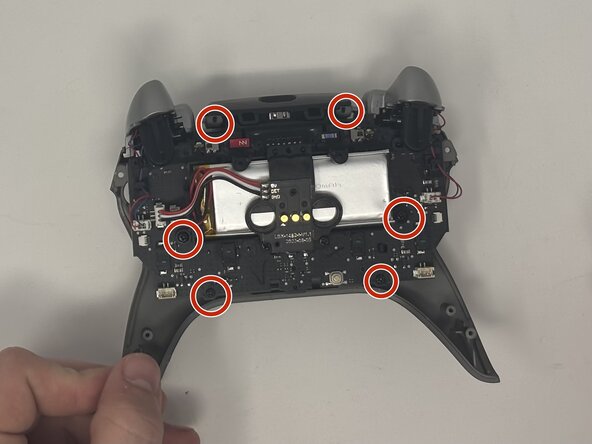
Verwijder de zes 10 mm schroeven die op het moederbord zitten met een Phillips #00 schroevendraaier.
-
-
-




Volg deze instructies in omgekeerde volgorde om je apparaat weer in elkaar te zetten.
Annuleren: ik heb deze handleiding niet afgemaakt.
Één andere persoon heeft deze handleiding voltooid.

Team

Utah Tech University, Team 1-7, McMurrin Fall 2025 Lid van Utah Tech University, Team 1-7, McMurrin Fall 2025
UTAHTECH-MCMURRIN-F25S1G7
2 Leden
77 handleidingen geschreven
