Ga door naar hoofdinhoud
Word lid van de reparatiegemeenschap - Account aanmaken

Turtle Beach Pure Air Battery Replacement

Wat je nodig hebt

  1. Turtle Beach Pure Air Battery Replacement, Bottom Cover: stap 1, afbeelding 1 van 2 Turtle Beach Pure Air Battery Replacement, Bottom Cover: stap 1, afbeelding 2 van 2
    • Power off the mouse by moving the power switch to the center.

    Vraag FixBot
  2. Turtle Beach Pure Air Battery Replacement: stap 2, afbeelding 1 van 2 Turtle Beach Pure Air Battery Replacement: stap 2, afbeelding 2 van 2
    • Peel back the mouse feet.

    • Remove the three 1.6mm screws using a JIS #000 screwdriver.

    • Remove the single 1.6mm screws using remove using a 1.3 mm hex screwdriver.

    Vraag FixBot
  3. Turtle Beach Pure Air Battery Replacement: stap 3, afbeelding 1 van 2 Turtle Beach Pure Air Battery Replacement: stap 3, afbeelding 2 van 2
    • Carefully remove the bottom cover of the mouse.

    • Be cautious of the cable connecting the bottom cover to the rest of the mouse.

    Vraag FixBot
  4. Turtle Beach Pure Air Battery Replacement: stap 4, afbeelding 1 van 3 Turtle Beach Pure Air Battery Replacement: stap 4, afbeelding 2 van 3 Turtle Beach Pure Air Battery Replacement: stap 4, afbeelding 3 van 3
    • Disconnect the ribbon cable securing the upper shell to the motherboard.

    • Lift the locking clip to release the cable from its connector.

    Vraag FixBot
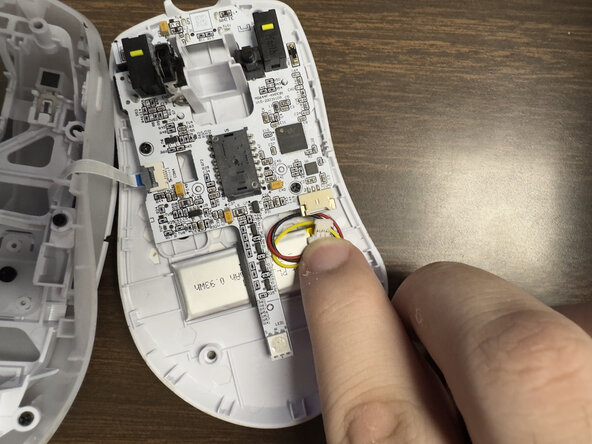
  5. Turtle Beach Pure Air Battery Replacement, Motherboard: stap 5, afbeelding 1 van 3 Turtle Beach Pure Air Battery Replacement, Motherboard: stap 5, afbeelding 2 van 3 Turtle Beach Pure Air Battery Replacement, Motherboard: stap 5, afbeelding 3 van 3
    • Carefully disconnect the battery clip from the motherboard socket by softly pulling the bottom of the clip.

    Vraag FixBot
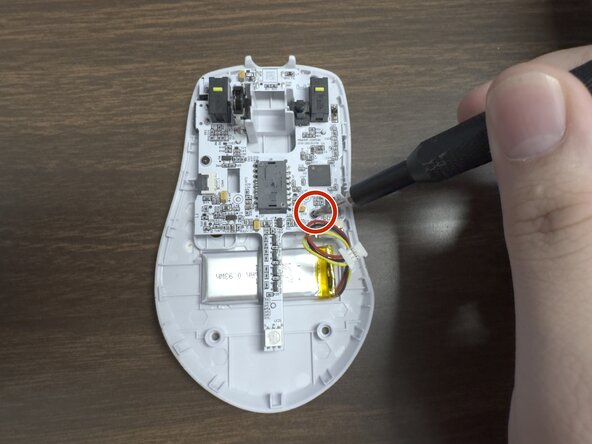
  6. Turtle Beach Pure Air Battery Replacement: stap 6, afbeelding 1 van 2 Turtle Beach Pure Air Battery Replacement: stap 6, afbeelding 2 van 2
    • Remove the two 1.6 mm screws on the middle left and lower right sides with a JIS000 screwdriver to disconnect the motherboard from the lower shell.

    Vraag FixBot
  7. Turtle Beach Pure Air Battery Replacement: stap 7, afbeelding 1 van 2 Turtle Beach Pure Air Battery Replacement: stap 7, afbeelding 2 van 2
    • Gently lift the motherboard out of the housing.

    Vraag FixBot
  8. Turtle Beach Pure Air Battery Replacement, Battery: stap 8, afbeelding 1 van 3 Turtle Beach Pure Air Battery Replacement, Battery: stap 8, afbeelding 2 van 3 Turtle Beach Pure Air Battery Replacement, Battery: stap 8, afbeelding 3 van 3
    • Carefully pry up the battery.

    • Prying the battery may take a bit of force since it is glued to the plastic.

    Vraag FixBot
Conclusie

To reassemble your device, follow these instructions in reverse order.

Preston Sanchez

Lid sinds: 02/03/26

291 Reputatie

3 handleidingen geschreven

0Gids Commentaar

Voeg opmerking toe

Weergavestatistieken:

Afgelopen 24 uren: 3

Afgelopen 7 dagen: 16

Afgelopen 30 dagen: 23

Altijd: 120