Ga door naar hoofdinhoud
Word lid van de reparatiegemeenschap - Account aanmaken

Teenage Engineering OP-Z Expansion Module Replacement

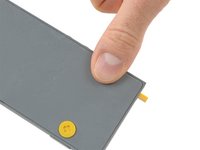
  1. Teenage Engineering OP-Z Expansion Module Replacement, Back Cover: stap 1, afbeelding 1 van 3 Teenage Engineering OP-Z Expansion Module Replacement, Back Cover: stap 1, afbeelding 2 van 3 Teenage Engineering OP-Z Expansion Module Replacement, Back Cover: stap 1, afbeelding 3 van 3
    • Unlock the four rubber feet by turning them 90° counterclockwise using your thumb or finger tip.

    • There is a tiny mark on every foot facing the bottom edge of the OP-Z. After turning them they should face towards the short edge where the on/off switch is.

    Vraag FixBot

    Voeg opmerking toe

  2. Teenage Engineering OP-Z Expansion Module Replacement: stap 2, afbeelding 1 van 2 Teenage Engineering OP-Z Expansion Module Replacement: stap 2, afbeelding 2 van 2
    • When turning the OP-Z over again the bottom plate should come off by itself (thanks gravity).

    • If the bottom plate won’t come off you might want to make sure every foot is rotated correctly and gently tug on one of them.

    Vraag FixBot

    Voeg opmerking toe

  3. Teenage Engineering OP-Z Expansion Module Replacement: stap 3, afbeelding 1 van 1
    • Remove the bottom plate including the rubber feet.

    Vraag FixBot

    Voeg opmerking toe

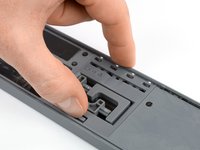
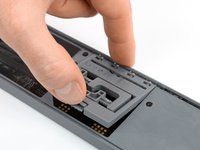
  4. Teenage Engineering OP-Z Expansion Module Replacement, Expansion Module: stap 4, afbeelding 1 van 2 Teenage Engineering OP-Z Expansion Module Replacement, Expansion Module: stap 4, afbeelding 2 van 2
    • Use your finger or a spudger to push up on the small tab on the bottom of the module.

    • Lift the module up and out of its recess bottom first.

    Vraag FixBot

    Voeg opmerking toe

  5. Teenage Engineering OP-Z Expansion Module Replacement: stap 5, afbeelding 1 van 1
    • Remove the module.

    • When inserting another module make sure you put it in outputs first. Then push down the bottom part for the tab to engage.

    Vraag FixBot

    Voeg opmerking toe

Conclusie

To reassemble your device, follow these instructions in reverse order.

Annuleren: ik heb deze handleiding niet afgemaakt.

Tobias Isakeit

Lid sinds: 03/31/14

134.237 Reputatie

189 handleidingen geschreven

Team

Tobias Isakeit - Repairability Engineer Lid van Tobias Isakeit - Repairability Engineer

Business

1 Lid

1.161 handleidingen geschreven

0Gids Commentaar

Voeg opmerking toe

Weergavestatistieken:

Afgelopen 24 uren: 1

Afgelopen 7 dagen: 5

Afgelopen 30 dagen: 34

Altijd: 1,572