Inleiding
Use this guide to replace the battery in your Sony BDP-SX1000.
Wat je nodig hebt
-
-
Stap 1 How To Open The Device
Voorzichtig: stappen 1-2 komen van een handleiding die in bewerking is.
-
Flip the Sony BDP-SX1000 over so that the underside is facing up.
-
Remove the four 2mm Phillips #0 screws at the top of the device.
-
Remove the rest of the J0mm Phillips #0 screws from the device.
 Vraag FixBot
-
-
-
-
Take out the seals at the bottom and at the corners with edge of screwdriver. Remove the J0mm Phillips #0 screws under the seals.
-
Remove the back lid of the Sony BDP-SX1000 so that you can now see the inside of the device. The two lids are attached by two wires. The small wire on right side of the top lid goes on right side of bottom lid or on the black connector. The big wire on left side of the top lid goes on left side of the bottom lid or on white connector.
-
-
-
-
-
The battery can be found at the bottom of the device.
-
Remove the battery by removing the white connector.
-
-


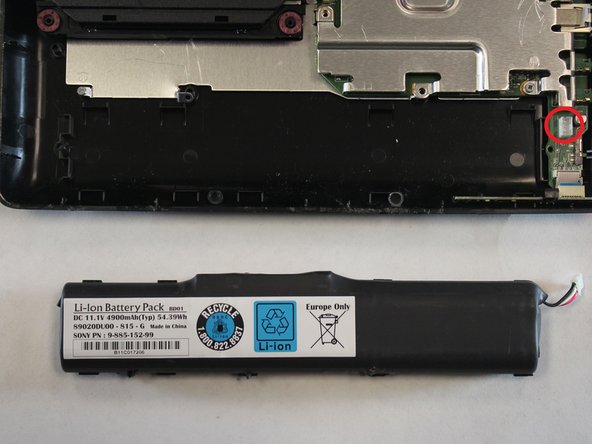
To reassemble your device, follow these instructions in reverse order.

Team

UC Davis, Team S4-G2, Lore Fall 2018 Lid van UC Davis, Team S4-G2, Lore Fall 2018
UCD-LORE-F18S4G2
3 Leden
9 handleidingen geschreven
