Deze vertaling is door een computer gegenereerd en is nog niet door iemand nagekeken. Spreek je deze taal? Bekijk het hier.
Wat je nodig hebt
-
-
Gereedschap gebruikt in deze stap:Tweezers$4.99
-
Het benodigde gereedschap is de Phillips #00 precisieschroevendraaier, kunststof Openingsgereedschap en pincet.
-
Plaats het kunststof Openingsgereedschap in de hoek van het apparaat en schuif langs de randen om de lijm los te maken.
-
Verwijder de klep
 Vraag FixBot
-
-
-
-
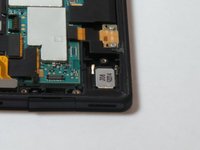
Verwijder de twee schroeven linksonder in het apparaat die de metalen plaat op de USB-poort vasthouden.
-
Metalen plaat verwijderen
-
Verwijder het plastic dat de USB-poort vastzet.
-
-
-
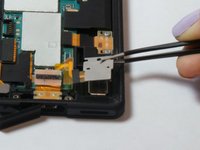
Verwijder de schroef met een schroevendraaier en til de metalen plaat op met een pincet.
-
Pak het linkeruiteinde van de elektrische tape vast
-
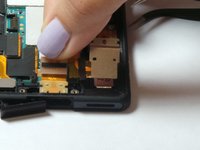
Til de USB-stekker op om deze uit de montagelocatie te verwijderen.
-
-


Volg deze instructies in omgekeerde volgorde om uw apparaat weer in elkaar te zetten.
Annuleren: ik heb deze handleiding niet afgemaakt.
30 andere personen hebben deze handleiding voltooid.

Team

USF Tampa, Team 15-6, Remmell Fall 2014 Lid van USF Tampa, Team 15-6, Remmell Fall 2014
USFT-REMMELL-F14S15G6
3 Leden
59 handleidingen geschreven
14Gids Commentaar
I was able to replace the usb port but my tablet still wont charge or be recognized as usb when connected to PC. What can this be? Any idea? Please I need help.
I also replace charging port with same result, I was not able to find a solution online so until I can find a magnetic docking station for sale I have bypassed the charging port and connected my usb direct to the battery with 100% result.
My tablet never goes outdoors so the waterproof covers is not needed, bloody well good job as there now is a usb cable poking out the cover and sealed closed with electrial type
I was able to replace my connector after much difficulty (the part I received wasn't the exact size so I had to cut a little bit and force a lot!). I worked great... For approx. 2 weeks. Now I'm back to square one. I was wondering if it would be possible to fabricate a magnetic dock (or similar), since the official one seems impossible to find?
I replaced the usb port and had the same problem as esteeizola because my battery was completely drained. (IMHO Sony has a design fault with their USB ports. They are rubish. If you get more than 200 plug/unplug operations out of a Sony USB you are very lucky).
What happened was that USB drew 4 to 5 milli-amps for about 10 to 12 amps. During this time the red led was lit but the device remained dead. Finally, USB started drawing a normally charging current (a very pathetic 300 milli-amps from what I can tell.) And the device came to life say the battery was 2% charged.
I don't what the reason is for this behavior but it certainly is very confusing and frustrating,
