Inleiding
This replacement guide provides step by step instructions with pictures to help replace your Sony Vaio PCG-3C2L battery. You may need to replace your battery if your laptop is failing to power on or if it is not holding a charge. To complete this replacement, an iFixit Opening Tool can be used, but it is optional.
Always check to make sure you have the correct battery. You can find replacement batteries here.
Wat je nodig hebt
-
-
Turn your computer over so the bottom is facing up.
-
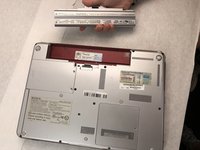
The battery should be in the top on the back of the computer.
 Vraag FixBot
-
-
-
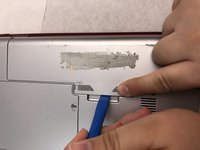
Initially, the "lock" button should be pushed all the way to the left. To unlock the battery, move the lock button from the left to the right.
-
-
-
-
After unlocking the battery, hold the "release" button and push to the left.
-
-
-
Keep the "release" button pressed.
-
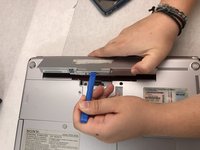
Use the iFixit opening tool (or your hands) to lift the battery up.
-


To reassemble your device, follow these instructions in reverse order.

Team

Embry-Riddle Aeronautical University, Team S8-G3, Salas Fall 2019 Lid van Embry-Riddle Aeronautical University, Team S8-G3, Salas Fall 2019
ERAU-SALAS-F19S8G3
4 Leden
12 handleidingen geschreven
