Ga door naar hoofdinhoud
Word lid van de reparatiegemeenschap - Account aanmaken

Sony VAIO PCG-F360 Single Key Replacement

Wat je nodig hebt

    1. Sony VAIO PCG-F360 Single Key Replacement, Battery: stap 1, afbeelding 1 van 1
      • Position the laptop screen-side down as shown.

      • In this position the battery housing will be located on the right hand side.

      Vraag FixBot

      Voeg opmerking toe

    2. Sony VAIO PCG-F360 Single Key Replacement: stap 2, afbeelding 1 van 1
      • Lift the panel up and then out to gain access to the battery.

      Vraag FixBot

      Voeg opmerking toe

    3. Sony VAIO PCG-F360 Single Key Replacement: stap 3, afbeelding 1 van 1
      • Use the indentations to pull the old battery out.

      Vraag FixBot

      Voeg opmerking toe

    4. Sony VAIO PCG-F360 Single Key Replacement: stap 4, afbeelding 1 van 1
      • The battery is now removed and it is safe to move on to uninstalling other components.

      Vraag FixBot

      Voeg opmerking toe

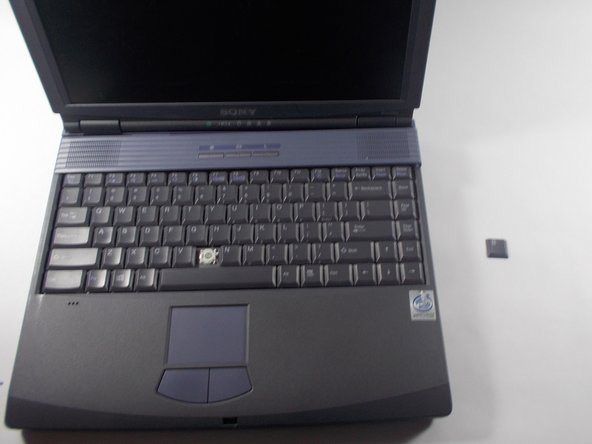
    1. Sony VAIO PCG-F360 Single Key Replacement, Single Key: stap 5, afbeelding 1 van 3 Sony VAIO PCG-F360 Single Key Replacement, Single Key: stap 5, afbeelding 2 van 3 Sony VAIO PCG-F360 Single Key Replacement, Single Key: stap 5, afbeelding 3 van 3
      • Use the pludger to pop off the key by prying under it.

      • You now can clean and replace the key.

      Vraag FixBot

      Voeg opmerking toe

Conclusie

To reassemble your device, follow these instructions in reverse order.

Annuleren: ik heb deze handleiding niet afgemaakt.

Hannah Millea

Lid sinds: 03/11/14

401 Reputatie

4 handleidingen geschreven

Team

UMass Dartmouth, Team 3-5, Calaway Spring 2014 Lid van UMass Dartmouth, Team 3-5, Calaway Spring 2014

UMASSD-CALAWAY-S14S3G5

2 Leden

24 handleidingen geschreven

0Gids Commentaar

Voeg opmerking toe

Weergavestatistieken:

Afgelopen 24 uren: 0

Afgelopen 7 dagen: 4

Afgelopen 30 dagen: 21

Altijd: 521