Ga door naar hoofdinhoud
Word lid van de reparatiegemeenschap - Account aanmaken

Sony Ericsson z300 Keypad Replacement

Wat je nodig hebt

  1. Sony Ericsson z300 Keypad Replacement, Back Phone Cover: stap 1, afbeelding 1 van 1
    • To remove the back cover, use your thumb to press down on the center of case and slide it off.

    Vraag FixBot

    Voeg opmerking toe

  2. Sony Ericsson z300 Keypad Replacement, Battery: stap 2, afbeelding 1 van 1
    • Using a fingernail lift the battery out of the phone.

    Vraag FixBot

    Voeg opmerking toe

  3. Sony Ericsson z300 Keypad Replacement, Sim Card: stap 3, afbeelding 1 van 1
    • Slide the sim card out with your thumb.

    Vraag FixBot

    Voeg opmerking toe

  4. Sony Ericsson z300 Keypad Replacement, Back Dark Grey Case: stap 4, afbeelding 1 van 1
    • To remove the back case first remove the four screws shown with a T5 Torx screwdriver

    Vraag FixBot

    Voeg opmerking toe

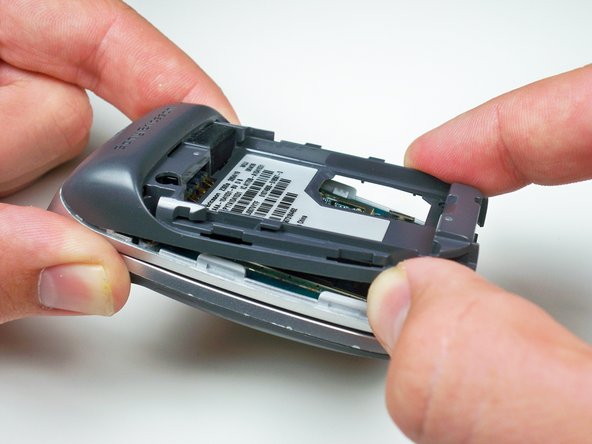
  5. Sony Ericsson z300 Keypad Replacement: stap 5, afbeelding 1 van 1
    • Using your fingernail lift up the side of the casing around the bottom of the phone to release all five of the clips.

    Vraag FixBot

    Voeg opmerking toe

  6. Sony Ericsson z300 Keypad Replacement: stap 6, afbeelding 1 van 1
    • Lift up towards the bottom and slide the case off.

    Vraag FixBot

    Voeg opmerking toe

  7. Sony Ericsson z300 Keypad Replacement, Motherboard: stap 7, afbeelding 1 van 1
    • Use a plastic opening tool to lift up the brass colored panel.

    Vraag FixBot

    Voeg opmerking toe

  8. Sony Ericsson z300 Keypad Replacement: stap 8, afbeelding 1 van 1
    • Flip up the yellow tab using a plastic opening tool to disconnect the motherboard from the phone body.

    Vraag FixBot

    Voeg opmerking toe

  9. Sony Ericsson z300 Keypad Replacement: stap 9, afbeelding 1 van 1
    • Work the plastic opening tool around the edges of the motherboard to release it from the clips.

    Vraag FixBot

    Voeg opmerking toe

  10. Sony Ericsson z300 Keypad Replacement, Keypad: stap 10, afbeelding 1 van 1
    • Using a plastic opening tool lift up the keypad to remove it.

    Vraag FixBot

    Voeg opmerking toe

Conclusie

To reassemble your device, follow these instructions in reverse order.

Annuleren: ik heb deze handleiding niet afgemaakt.

Één andere persoon heeft deze handleiding voltooid.

Alex Serventi

Lid sinds: 10/07/10

65 Reputatie

13 handleidingen geschreven

Team

Cal Poly, Team 5-15, Maness Fall 2010 Lid van Cal Poly, Team 5-15, Maness Fall 2010

CPSU-MANESS-F10S5G15

4 Leden

26 handleidingen geschreven

0Gids Commentaar

Voeg opmerking toe

Weergavestatistieken:

Afgelopen 24 uren: 0

Afgelopen 7 dagen: 7

Afgelopen 30 dagen: 29

Altijd: 1,623