Ga door naar hoofdinhoud
Word lid van de reparatiegemeenschap - Account aanmaken

Sony CCD-TR81 Microphone Casing Replacement

Wat je nodig hebt

  1. Sony CCD-TR81 Microphone Casing Replacement, Disassembling Sony CCD-TR81 Battery: stap 1, afbeelding 1 van 1
    • Lift viewfinder to access battery pack.

    Vraag FixBot

    Voeg opmerking toe

  2. Sony CCD-TR81 Microphone Casing Replacement: stap 2, afbeelding 1 van 2 Sony CCD-TR81 Microphone Casing Replacement: stap 2, afbeelding 2 van 2
    • Press the battery release button.

    • While pushing the battery button, slide the battery to the left.

    Vraag FixBot

    Voeg opmerking toe

  3. Sony CCD-TR81 Microphone Casing Replacement: stap 3, afbeelding 1 van 1
    • Pull the battery pack out of the video camera.

    Vraag FixBot

    Voeg opmerking toe

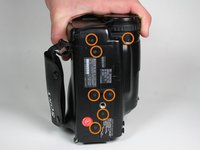
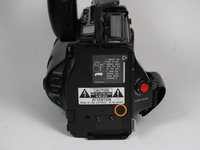
  4. Sony CCD-TR81 Microphone Casing Replacement, Outer Case: stap 4, afbeelding 1 van 3 Sony CCD-TR81 Microphone Casing Replacement, Outer Case: stap 4, afbeelding 2 van 3 Sony CCD-TR81 Microphone Casing Replacement, Outer Case: stap 4, afbeelding 3 van 3
    • Open the cassette cover.

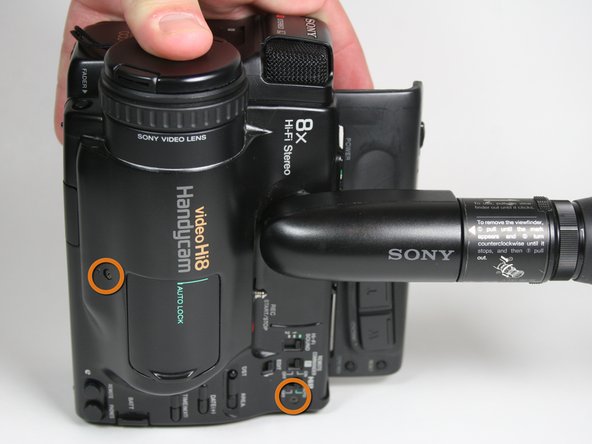
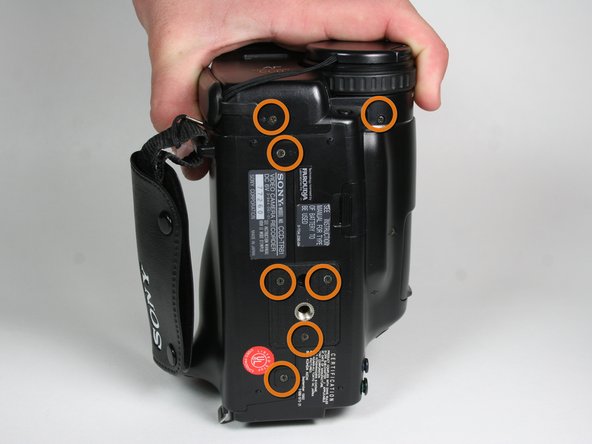
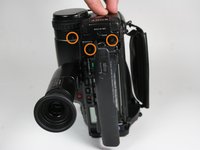
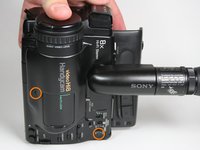
    • Unscrew 14 screws located on the outer casing. Three are located on the top face 2x6.8mm and 1X4.54mm, three on the left face 1x4.54mm,1x5.3mm and seven on the bottom face 5x4.54mm and 2x6.77mm.

    Vraag FixBot

    Voeg opmerking toe

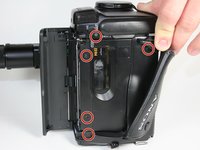
  5. Sony CCD-TR81 Microphone Casing Replacement: stap 5, afbeelding 1 van 2 Sony CCD-TR81 Microphone Casing Replacement: stap 5, afbeelding 2 van 2
    • Remove five screws from the right side, from bottom to top, 3x4.54mm 2x5.70mm.

    • Remove the single 4.5 mm screw from the backside.

    Vraag FixBot

    Voeg opmerking toe

  6. Sony CCD-TR81 Microphone Casing Replacement: stap 6, afbeelding 1 van 1
    • Pull off the plastic tape cover by lifting it up and out of the camera base.

    Vraag FixBot

    Voeg opmerking toe

  7. Sony CCD-TR81 Microphone Casing Replacement: stap 7, afbeelding 1 van 1
    • Disconnect the mic assembly by pulling it away from the camera base.

    • Do not pull too hard as the wires are still connected.

    Vraag FixBot

    Voeg opmerking toe

  8. Sony CCD-TR81 Microphone Casing Replacement: stap 8, afbeelding 1 van 1
    • Pull the bottom part of the case away from the camera.

    Vraag FixBot

    Voeg opmerking toe

  9. Sony CCD-TR81 Microphone Casing Replacement: stap 9, afbeelding 1 van 1
    • Remove the three 4.5 mm screws from the right face of the video camera.

    Vraag FixBot

    Voeg opmerking toe

  10. Sony CCD-TR81 Microphone Casing Replacement: stap 10, afbeelding 1 van 1
    • Remove the single 3.6 mm screw at the front of the video camera on the circuit board.

    Vraag FixBot

    Voeg opmerking toe

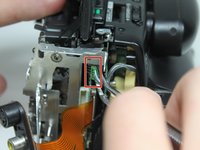
  11. Sony CCD-TR81 Microphone Casing Replacement: stap 11, afbeelding 1 van 1
    • Pull the audio/video inputs underneath the microphone assembly. The inputs should still be connected to the circuit board.

    Vraag FixBot

    Voeg opmerking toe

  12. Sony CCD-TR81 Microphone Casing Replacement: stap 12, afbeelding 1 van 1
    • Remove two remaining 3.6 mm case screws from the front of the camera.

    Vraag FixBot

    Voeg opmerking toe

  13. Sony CCD-TR81 Microphone Casing Replacement: stap 13, afbeelding 1 van 2 Sony CCD-TR81 Microphone Casing Replacement: stap 13, afbeelding 2 van 2
    Gereedschap gebruikt in deze stap:
    Tweezers
    $4.99
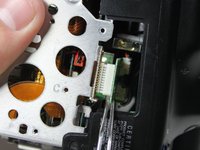
    • Using metal tweezers, pull out the plastic connector box on the front side.

    • Again use metal tweezers to pull out the connection box on the bottom of the camera. The right side of the case can now be removed by pulling it to the right.

    Vraag FixBot

    Voeg opmerking toe

  14. Sony CCD-TR81 Microphone Casing Replacement, Microphone Casing: stap 14, afbeelding 1 van 1
    • Unscrew the blue screw behind microphone and remove it from the video camera 1x3.6mm.

    Vraag FixBot

    Voeg opmerking toe

  15. Sony CCD-TR81 Microphone Casing Replacement: stap 15, afbeelding 1 van 1
    • Pull the circuit board up and away from the microphone case.

    Vraag FixBot

    Voeg opmerking toe

  16. Sony CCD-TR81 Microphone Casing Replacement: stap 16, afbeelding 1 van 1
    • Pull up metal brackets with plastic removal tool.

    Vraag FixBot

    Voeg opmerking toe

  17. Sony CCD-TR81 Microphone Casing Replacement: stap 17, afbeelding 1 van 1
    • With the plastic removal tool, pry up the microphone housing units. This will allow access to the camcorder microphone.

    Vraag FixBot

    Voeg opmerking toe

Conclusie

To reassemble your device, follow these instructions in reverse order.

Annuleren: ik heb deze handleiding niet afgemaakt.

Austin Winther

Lid sinds: 01/24/11

4 Reputatie

1 Handleiding geschreven

Team

Cal Poly, Team 11-25, Maness Winter 2011 Lid van Cal Poly, Team 11-25, Maness Winter 2011

CPSU-MANESS-W11S11G25

4 Leden

5 handleidingen geschreven

0Gids Commentaar

Voeg opmerking toe

Weergavestatistieken:

Afgelopen 24 uren: 0

Afgelopen 7 dagen: 4

Afgelopen 30 dagen: 23

Altijd: 1,572