Ga door naar hoofdinhoud
Word lid van de reparatiegemeenschap - Account aanmaken

Sony Alpha NEX-C3 Control Wheel Replacement

Wat je nodig hebt

  1. Sony Alpha NEX-C3 Control Wheel Replacement, Top Panel: stap 1, afbeelding 1 van 1
    • Turn the camera off by sliding the power switch.

  2. Sony Alpha NEX-C3 Control Wheel Replacement: stap 2, afbeelding 1 van 1
    • Use a Phillips head 000 screwdriver to remove the 4.0mm screw inside the USB port.

  3. Sony Alpha NEX-C3 Control Wheel Replacement: stap 3, afbeelding 1 van 1
    • Use a Phillips head 000 screwdriver to remove the one 4.0mm screw on the side opposite of the USB port near the shutter button.

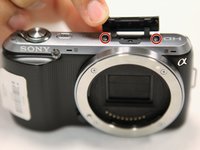
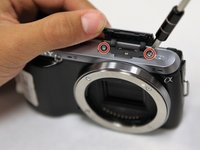
  4. Sony Alpha NEX-C3 Control Wheel Replacement: stap 4, afbeelding 1 van 2 Sony Alpha NEX-C3 Control Wheel Replacement: stap 4, afbeelding 2 van 2
    • Open the flap at the top of the camera.

    • Use a Phillips head 000 screwdriver to remove the two 4.0mm screws inside.

  5. Sony Alpha NEX-C3 Control Wheel Replacement: stap 5, afbeelding 1 van 1
    • Gently lift off the top panel with your hands.

  6. Sony Alpha NEX-C3 Control Wheel Replacement, Back Panel: stap 6, afbeelding 1 van 1
    • Use a Phillips head 000 screwdriver to remove the 4.0mm screw at the side opposite of the USB port.

  7. Sony Alpha NEX-C3 Control Wheel Replacement: stap 7, afbeelding 1 van 2 Sony Alpha NEX-C3 Control Wheel Replacement: stap 7, afbeelding 2 van 2
    • Use a Phillips head 000 screwdriver to remove the three 4.0mm screws on the bottom of the camera.

  8. Sony Alpha NEX-C3 Control Wheel Replacement: stap 8, afbeelding 1 van 1
    • Tilt up the LCD screen.

    • Use a Phillips head 000 screwdriver to remove the two coarse 4.0mm screws near the bottom of the camera.

  9. Sony Alpha NEX-C3 Control Wheel Replacement: stap 9, afbeelding 1 van 1
    • Gently pry off the back panel, by wiggling it around the LCD screen.

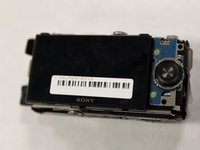
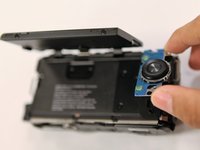
  10. Sony Alpha NEX-C3 Control Wheel Replacement, Control Wheel: stap 10, afbeelding 1 van 2 Sony Alpha NEX-C3 Control Wheel Replacement, Control Wheel: stap 10, afbeelding 2 van 2
    • Tilt up the LCD screen.

    • Grab the silver plate, and gently pry it up.

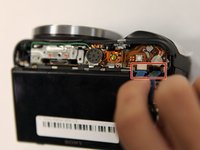
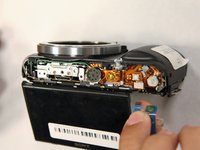
  11. Sony Alpha NEX-C3 Control Wheel Replacement: stap 11, afbeelding 1 van 2 Sony Alpha NEX-C3 Control Wheel Replacement: stap 11, afbeelding 2 van 2
    • Gently pinch blue ribbon cable, and pull it out of the port.

Conclusie

To reassemble your device, follow these instructions in reverse order.

3 andere personen hebben deze handleiding voltooid.

Jonathan Chen

Lid sinds: 10/17/17

705 Reputatie

6 handleidingen geschreven

Team

UC Santa Barbara, Team S1-G1, Weedon Fall 2017 Lid van UC Santa Barbara, Team S1-G1, Weedon Fall 2017

UCSB-WEEDON-F17S1G1

3 Leden

13 handleidingen geschreven

0Gids Commentaar

Voeg opmerking toe

Weergavestatistieken:

Afgelopen 24 uren: 2

Afgelopen 7 dagen: 14

Afgelopen 30 dagen: 67

Altijd: 4,005