Ga door naar hoofdinhoud
Word lid van de reparatiegemeenschap - Account aanmaken

Sony Alpha NEX-C3 Battery Replacement

    1. Sony Alpha NEX-C3 Battery Replacement, Battery: stap 1, afbeelding 1 van 1
      • Slide the power switch to off.

      Vraag FixBot

      Voeg opmerking toe

    2. Sony Alpha NEX-C3 Battery Replacement: stap 2, afbeelding 1 van 2 Sony Alpha NEX-C3 Battery Replacement: stap 2, afbeelding 2 van 2
      • Slide the switch on the bottom of the battery flap to unlock it.

      Vraag FixBot

      Voeg opmerking toe

    3. Sony Alpha NEX-C3 Battery Replacement: stap 3, afbeelding 1 van 2 Sony Alpha NEX-C3 Battery Replacement: stap 3, afbeelding 2 van 2
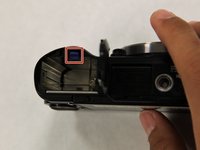
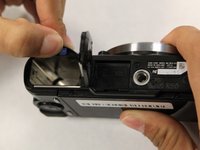
      • Push back the blue tab in the battery port.

      • Afterwards, the battery should pop up. Remove it with your hands.

      Vraag FixBot

      Voeg opmerking toe

Conclusie

To reassemble your device, follow these instructions in reverse order.

Annuleren: ik heb deze handleiding niet afgemaakt.

Jonathan Chen

Lid sinds: 10/17/17

705 Reputatie

6 handleidingen geschreven

Team

UC Santa Barbara, Team S1-G1, Weedon Fall 2017 Lid van UC Santa Barbara, Team S1-G1, Weedon Fall 2017

UCSB-WEEDON-F17S1G1

3 Leden

13 handleidingen geschreven

0Gids Commentaar

Voeg opmerking toe

Weergavestatistieken:

Afgelopen 24 uren: 3

Afgelopen 7 dagen: 13

Afgelopen 30 dagen: 27

Altijd: 1,470