Ga door naar hoofdinhoud
Word lid van de reparatiegemeenschap - Account aanmaken

Sony Alpha NEX-6 Lens Mount Replacement

Wat je nodig hebt

    1. Sony Alpha NEX-6 Lens Mount Replacement, Finding the Release Button: stap 1, afbeelding 1 van 1
      • Turn the camera with the lens facing up.

      • Find the lens release button - located along the side of the silver lens mount.

      Vraag FixBot

      Voeg opmerking toe

    2. Sony Alpha NEX-6 Lens Mount Replacement, Removing the Lens: stap 2, afbeelding 1 van 2 Sony Alpha NEX-6 Lens Mount Replacement, Removing the Lens: stap 2, afbeelding 2 van 2
      • Press and hold the lens release button while rotating the lens counterclockwise.

      • Lift the lens when it is no longer attached to the camera.

      • To replace the lens, align the white dot on the lens with the white dot located on the silver lens mount. (See image two)

      • Insert the lens and rotate it clockwise until it is locked in place.

      Vraag FixBot

      Voeg opmerking toe

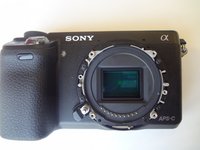
    1. Sony Alpha NEX-6 Lens Mount Replacement, Lens Mount: stap 3, afbeelding 1 van 1
      • While dealing with this guide, do not touch the delicate image sensor (the center rectangle encircled by the lens mount).

      • After removing the lens, you will come into contact with the lens mount. Start by unscrewing the four 3.5 mm Phillips #00 screws.

      • The outer lens mount ring can now be removed.

      Vraag FixBot

      Voeg opmerking toe

    2. Sony Alpha NEX-6 Lens Mount Replacement: stap 4, afbeelding 1 van 3 Sony Alpha NEX-6 Lens Mount Replacement: stap 4, afbeelding 2 van 3 Sony Alpha NEX-6 Lens Mount Replacement: stap 4, afbeelding 3 van 3
      Gereedschap gebruikt in deze stap:
      Tweezers
      $4.99
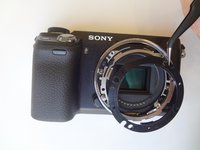
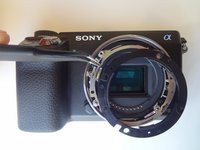
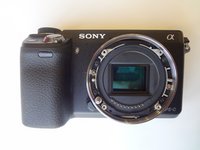
      • Pay attention to the positioning of the spacer rings for reassembly.

      • For the first (black) spacer ring, use the tweezers to gently pry the ring out of place.

      • Repeat this step for the second (silver) spacer ring.

      • The third image is what the camera should look like after all spacer rings are removed.

      Vraag FixBot

      Voeg opmerking toe

    3. Sony Alpha NEX-6 Lens Mount Replacement: stap 5, afbeelding 1 van 2 Sony Alpha NEX-6 Lens Mount Replacement: stap 5, afbeelding 2 van 2
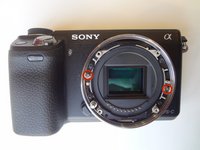
      • To remove the inner lens mount ring, remove the two silver 2.0 mm Phillips #00 screws. This will complete the removal of the lens mount.

      Vraag FixBot

      Voeg opmerking toe

Conclusie

To reassemble your device, follow these instructions in reverse order.

Annuleren: ik heb deze handleiding niet afgemaakt.

3 andere personen hebben deze handleiding voltooid.

Clayton Dale

Lid sinds: 01/20/15

1.067 Reputatie

7 handleidingen geschreven

Team

USF Tampa, Team 11-2, Blackwell Winter 2015 Lid van USF Tampa, Team 11-2, Blackwell Winter 2015

USFT-BLACKWELL-W15S11G2

4 Leden

14 handleidingen geschreven

0Gids Commentaar

Voeg opmerking toe

Weergavestatistieken:

Afgelopen 24 uren: 5

Afgelopen 7 dagen: 15

Afgelopen 30 dagen: 46

Altijd: 2,223