Ga door naar hoofdinhoud
Word lid van de reparatiegemeenschap - Account aanmaken

Siemens A56 Keyboard Replacement

    1. Siemens A56 Keyboard Replacement, Battery: stap 1, afbeelding 1 van 1
      • Press down on the grooved area firmly in the direction of arrow #1.

      • While maintaining the downwards pressure, push the back cover in the direction of arrow #2 until the back cover slides off.

      • Photos taken from: http://theinformr.com/uploads/manuals/si...

      Vraag FixBot

      Voeg opmerking toe

    2. Siemens A56 Keyboard Replacement: stap 2, afbeelding 1 van 1
      • Turn off the phone before removing the battery to avoid damage.

      • Press the latch on the battery in the direction of arrow #3.

      • Lift battery at the cutout on the side of the phone, then tilt upwards and remove.

      • It may be necessary to use the tip of a fingernail or a plastic lifting tool to remove the battery.

      • Photos taken from: http://theinformr.com/uploads/manuals/si...

      Vraag FixBot

      Voeg opmerking toe

    1. Siemens A56 Keyboard Replacement, Front Plate: stap 3, afbeelding 1 van 3 Siemens A56 Keyboard Replacement, Front Plate: stap 3, afbeelding 2 van 3 Siemens A56 Keyboard Replacement, Front Plate: stap 3, afbeelding 3 van 3
      • Firmly grasp the white casing of the phone with one hand and the blue cover with the other hand as seen in the first picture.

      • Pull up on the two plastic clips at the top of the phone.

      • While the clips are pulled up, pull the blue cover away from the white casing to remove it.

      Vraag FixBot

      Voeg opmerking toe

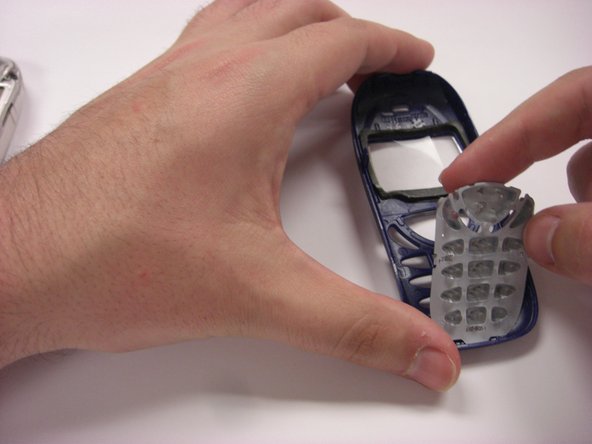
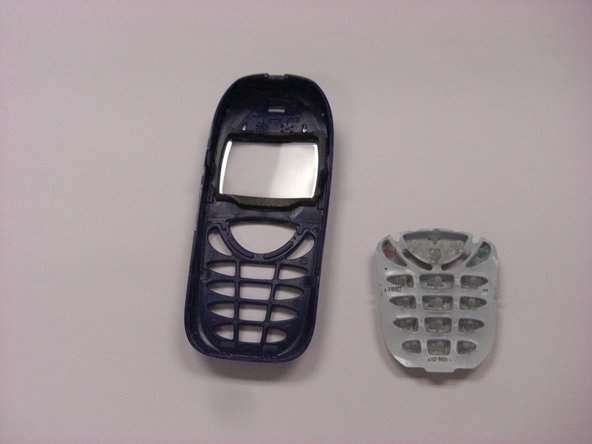
    1. Siemens A56 Keyboard Replacement, Keyboard: stap 4, afbeelding 1 van 3 Siemens A56 Keyboard Replacement, Keyboard: stap 4, afbeelding 2 van 3 Siemens A56 Keyboard Replacement, Keyboard: stap 4, afbeelding 3 van 3
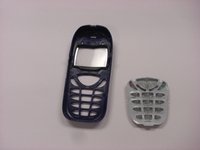
      • The keyboard can be easily removed by hand.

      • Once the old keyboard has been removed, it is possible to replace it with a new keyboard.

      Vraag FixBot

      Voeg opmerking toe

Conclusie

To reassemble your device, follow these instructions in reverse order.

Annuleren: ik heb deze handleiding niet afgemaakt.

Andrew Corriveau

Lid sinds: 03/26/14

97 Reputatie

1 Handleiding geschreven

Team

Clemson, Team 6-6, Benson Spring 2014 Lid van Clemson, Team 6-6, Benson Spring 2014

CLEM-BENSON-S14S6G6

4 Leden

36 handleidingen geschreven

0Gids Commentaar

Voeg opmerking toe

Weergavestatistieken:

Afgelopen 24 uren: 0

Afgelopen 7 dagen: 11

Afgelopen 30 dagen: 36

Altijd: 641