Ga door naar hoofdinhoud
Word lid van de reparatiegemeenschap - Account aanmaken

Shop-Vac MC150A Power Switch Replacement

Wat je nodig hebt

  1. Shop-Vac MC150A Power Switch Replacement, Unlatch the power unit assembly: stap 1, afbeelding 1 van 1
    • Before you begin, make sure to switch off the device and unplug it from the outlet.

    • Unlatch the two side clips securing the power unit assembly to the tank.

    • Remove the power unit assembly from the tank assembly.

    Vraag FixBot

    Voeg opmerking toe

  2. Shop-Vac MC150A Power Switch Replacement, Remove the top cover: stap 2, afbeelding 1 van 2 Shop-Vac MC150A Power Switch Replacement, Remove the top cover: stap 2, afbeelding 2 van 2
    • Use a 3.5 mm hex key to remove the three screws securing the top cover.

    • Remove the top cover.

    Vraag FixBot

    Voeg opmerking toe

  3. Shop-Vac MC150A Power Switch Replacement: stap 3, afbeelding 1 van 1
    • Use a 3.5 mm hex key to remove the four screws securing the power unit assembly.

    Vraag FixBot

    Voeg opmerking toe

  4. Shop-Vac MC150A Power Switch Replacement: stap 4, afbeelding 1 van 1
    • Separate the power unit assembly from the cover.

    Vraag FixBot

    Voeg opmerking toe

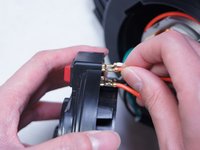
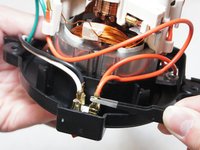
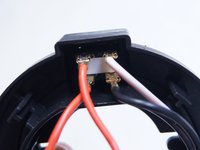
  5. Shop-Vac MC150A Power Switch Replacement, Disconnect the switch: stap 5, afbeelding 1 van 3 Shop-Vac MC150A Power Switch Replacement, Disconnect the switch: stap 5, afbeelding 2 van 3 Shop-Vac MC150A Power Switch Replacement, Disconnect the switch: stap 5, afbeelding 3 van 3
    • Pull out and disconnect the four spade connectors from the switch module.

    • During reassembly, use the last image as a reference for how to connect the wires.

    Vraag FixBot

    Voeg opmerking toe

  6. Shop-Vac MC150A Power Switch Replacement: stap 6, afbeelding 1 van 1
    • Use a spudger to pry up and remove the red switch from the housing.

    Vraag FixBot

    Voeg opmerking toe

Conclusie

To reassemble your device, follow these instructions in reverse order.

Annuleren: ik heb deze handleiding niet afgemaakt.

6 andere personen hebben deze handleiding voltooid.

Ngunlian

Lid sinds: 02/08/16

756 Reputatie

5 handleidingen geschreven

Team

IUPUI, Team 1-2, Baechle Spring 2016 Lid van IUPUI, Team 1-2, Baechle Spring 2016

IUPUI-BAECHLE-S16S1G2

5 Leden

13 handleidingen geschreven

0Gids Commentaar

Voeg opmerking toe

Weergavestatistieken:

Afgelopen 24 uren: 4

Afgelopen 7 dagen: 21

Afgelopen 30 dagen: 122

Altijd: 18,482