Ga door naar hoofdinhoud
Word lid van de reparatiegemeenschap - Account aanmaken

Seville Classics MSC10166 Disassembly

Wat je nodig hebt

  1. Seville Classics MSC10166 Disassembly, PCB (Printed Circuit Board): stap 1, afbeelding 1 van 1
    • Use the Phillips #2 screwdriver to remove the four 6 mm screws by unscrewing counterclockwise.

    Vraag FixBot

    Voeg opmerking toe

  2. Seville Classics MSC10166 Disassembly: stap 2, afbeelding 1 van 1
    • Pull the front and back cover apart.

    • Be careful not to pull the front cover off completely. It holds the wires.

    Vraag FixBot

    Voeg opmerking toe

  3. Seville Classics MSC10166 Disassembly: stap 3, afbeelding 1 van 1
    • Remove the Phillips 6 mm screw that holds the circuit board to the outer shell of the fan.

    • Shock warning: Make sure the fan is unplugged before removing the circuit board.

    Vraag FixBot

    Voeg opmerking toe

  4. Seville Classics MSC10166 Disassembly: stap 4, afbeelding 1 van 1
    • Remove the top cover containing the circuit board and the wires by pulling it away from the outer shell of the fan.

    Vraag FixBot

    Voeg opmerking toe

  5. Seville Classics MSC10166 Disassembly: stap 5, afbeelding 1 van 2 Seville Classics MSC10166 Disassembly: stap 5, afbeelding 2 van 2
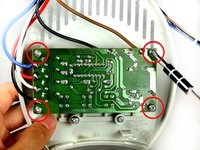
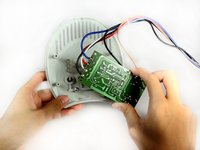
    • Remove the screws from the four corners of the circuit board.

    • Remove the circuit board from the top cover.

    • Do not touch the other side of the circuit board to avoid damaging the circuit elements.

    Vraag FixBot

    Voeg opmerking toe

  6. Seville Classics MSC10166 Disassembly, Rotating Blade and Transformer: stap 6, afbeelding 1 van 2 Seville Classics MSC10166 Disassembly, Rotating Blade and Transformer: stap 6, afbeelding 2 van 2
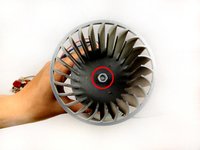
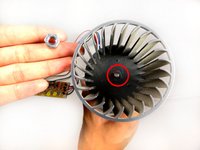
    • In order to remove the fan blade, use pliers to remove the holding nut.

    • After the holding nut is loose, use the pliers to pull up to remove the nut.

    Vraag FixBot

    Voeg opmerking toe

  7. Seville Classics MSC10166 Disassembly: stap 7, afbeelding 1 van 1
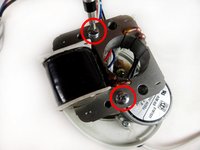
    • Remove the two bronze Phillips 29-mm bolts that hold the fan blade to the transformer.

    • Use a pair of pliers to hold the nut at the bottom of the transformer, as you unscrew from left-to-right at the top of the transformer. After, pull up and remove both the screw and nut.

    Vraag FixBot

    Voeg opmerking toe

  8. Seville Classics MSC10166 Disassembly: stap 8, afbeelding 1 van 2 Seville Classics MSC10166 Disassembly: stap 8, afbeelding 2 van 2
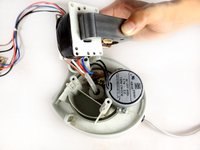
    • Next, remove the two silver Phillips (8-mm head) 40-mm screws from the transformer.

    • Remove screws by pulling them away from the base.

    • The transformer should be free after this step.

    Vraag FixBot

    Voeg opmerking toe

  9. Seville Classics MSC10166 Disassembly, Seville Classics MSC10166: stap 9, afbeelding 1 van 2 Seville Classics MSC10166 Disassembly, Seville Classics MSC10166: stap 9, afbeelding 2 van 2
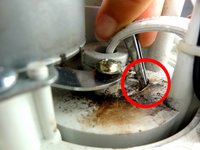
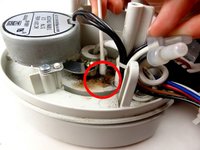
    • Clean the track, removing any obstructions.

    • Lubricate the track with grease.

    Vraag FixBot

    Voeg opmerking toe

Conclusie

To reassemble your device, follow these instructions in reverse order.

Annuleren: ik heb deze handleiding niet afgemaakt.

2 andere personen hebben deze handleiding voltooid.

Queena Phung

Lid sinds: 09/26/12

114 Reputatie

3 handleidingen geschreven

Team

Cal Poly, Team 15-46, Forte Fall 2012 Lid van Cal Poly, Team 15-46, Forte Fall 2012

CPSU-FORTE-F12S15G46

5 Leden

6 handleidingen geschreven

0Gids Commentaar

Voeg opmerking toe

Weergavestatistieken:

Afgelopen 24 uren: 13

Afgelopen 7 dagen: 36

Afgelopen 30 dagen: 134

Altijd: 12,553