Ga door naar hoofdinhoud
Word lid van de reparatiegemeenschap - Account aanmaken

Samsung WB850F Lens Assembly Replacement

Wat je nodig hebt

    1. Samsung WB850F Lens Assembly  Replacement, Control Panel: stap 1, afbeelding 1 van 3 Samsung WB850F Lens Assembly  Replacement, Control Panel: stap 1, afbeelding 2 van 3 Samsung WB850F Lens Assembly  Replacement, Control Panel: stap 1, afbeelding 3 van 3
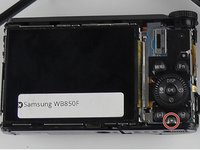
      • Use the Phillips #0 screwdriver to remove the six outside screws. Orientation is from the front of the camera.

      • 2 screws are located on the bottom.

      • 2 screws are located on the left side. (HDMI port)

      • 2 screws are located on the right side of the camera. (Opposite HDMI side)

      Vraag FixBot

      Voeg opmerking toe

    2. Samsung WB850F Lens Assembly  Replacement: stap 2, afbeelding 1 van 1
      • To remove the back screen case, use the blue opening tool to open the case up from the right side.

      Vraag FixBot

      Voeg opmerking toe

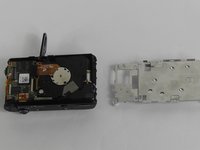
    3. Samsung WB850F Lens Assembly  Replacement: stap 3, afbeelding 1 van 2 Samsung WB850F Lens Assembly  Replacement: stap 3, afbeelding 2 van 2
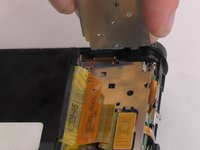
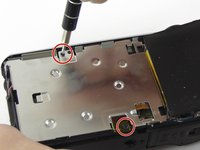
      • Use screwdriver to remove control panel screw.

      • Lift up control panel from the side where the screw was just removed.

      Vraag FixBot

      Voeg opmerking toe

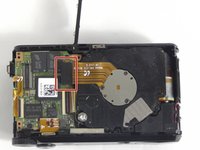
    1. Samsung WB850F Lens Assembly  Replacement, Lens Assembly: stap 4, afbeelding 1 van 3 Samsung WB850F Lens Assembly  Replacement, Lens Assembly: stap 4, afbeelding 2 van 3 Samsung WB850F Lens Assembly  Replacement, Lens Assembly: stap 4, afbeelding 3 van 3
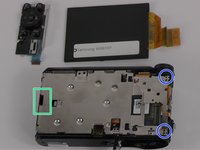
      • Remove the two screws.

      • Remove the two screws.

      • Gently pry open metal case using Plastic tool openers.

      Vraag FixBot

      Voeg opmerking toe

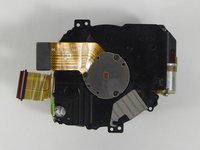
    2. Samsung WB850F Lens Assembly  Replacement: stap 5, afbeelding 1 van 2 Samsung WB850F Lens Assembly  Replacement: stap 5, afbeelding 2 van 2
      • Gently pull up on the lens connector chip to remove the lens.

      Vraag FixBot

      Voeg opmerking toe

    3. Samsung WB850F Lens Assembly  Replacement: stap 6, afbeelding 1 van 1
      • Insert the new lens to be replaced. Make sure you do not get this tab caught while inserting new lens.

      Vraag FixBot

      Voeg opmerking toe

Conclusie

To reassemble your device, follow these instructions in reverse order.

Annuleren: ik heb deze handleiding niet afgemaakt.

2 andere personen hebben deze handleiding voltooid.

Jousling Vazquez

Lid sinds: 02/08/16

431 Reputatie

4 handleidingen geschreven

Team

USF Tampa, Team 12-4, Eyestone Spring 2016 Lid van USF Tampa, Team 12-4, Eyestone Spring 2016

USFT-EYESTONE-S16S12G4

4 Leden

8 handleidingen geschreven

2Gids Commentaar

hi I have problem...could you please help me with my camera samsung wb850f

merdaneliyev - Antwoord Deel

I am forward to hearing from you....

merdaneliyev - Antwoord Deel

Voeg opmerking toe

Weergavestatistieken:

Afgelopen 24 uren: 0

Afgelopen 7 dagen: 8

Afgelopen 30 dagen: 29

Altijd: 2,001