Ga door naar hoofdinhoud
Word lid van de reparatiegemeenschap - Account aanmaken

Samsung ST76 Motherboard Replacement

Wat je nodig hebt

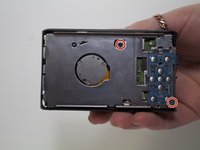
  1. Samsung ST76 Motherboard Replacement, Back Panel: stap 1, afbeelding 1 van 3 Samsung ST76 Motherboard Replacement, Back Panel: stap 1, afbeelding 2 van 3 Samsung ST76 Motherboard Replacement, Back Panel: stap 1, afbeelding 3 van 3
    • Use a Phillips head screwdriver to remove 5 screws from the camera. There are 2 4mm screws on the left side, 2 2mm screws on the right side and 1 4mm screw on the bottom.

    • Do not mix the 5 screws; they are different sizes.

    Vraag FixBot

    Voeg opmerking toe

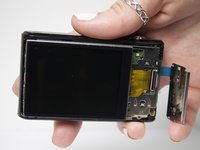
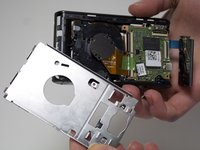
  2. Samsung ST76 Motherboard Replacement: stap 2, afbeelding 1 van 2 Samsung ST76 Motherboard Replacement: stap 2, afbeelding 2 van 2
    • Use your fingers to pull the back cover off.

    Vraag FixBot

    Voeg opmerking toe

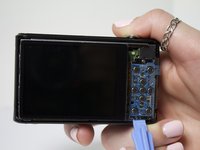
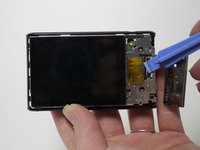
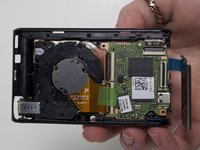
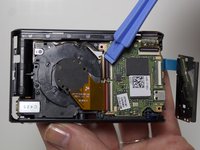
  3. Samsung ST76 Motherboard Replacement, Screen: stap 3, afbeelding 1 van 2 Samsung ST76 Motherboard Replacement, Screen: stap 3, afbeelding 2 van 2
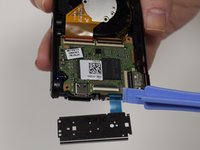
    • Separate the button panel to reveal the port holding the screen on.

    • Use a plastic opening tool to help with this task.

    Vraag FixBot

    Voeg opmerking toe

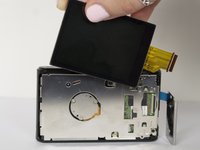
  4. Samsung ST76 Motherboard Replacement: stap 4, afbeelding 1 van 2 Samsung ST76 Motherboard Replacement: stap 4, afbeelding 2 van 2
    • Remove the yellow cable by pulling gently upwards, away from the inside of the camera, until it separates from its port.

    Vraag FixBot

    Voeg opmerking toe

  5. Samsung ST76 Motherboard Replacement, Motherboard: stap 5, afbeelding 1 van 3 Samsung ST76 Motherboard Replacement, Motherboard: stap 5, afbeelding 2 van 3 Samsung ST76 Motherboard Replacement, Motherboard: stap 5, afbeelding 3 van 3
    • Remove 2 3mm screws from the metal plate covering the motherboard and lens using a Phillips #00 screw driver.

    Vraag FixBot

    Voeg opmerking toe

  6. Samsung ST76 Motherboard Replacement: stap 6, afbeelding 1 van 3 Samsung ST76 Motherboard Replacement: stap 6, afbeelding 2 van 3 Samsung ST76 Motherboard Replacement: stap 6, afbeelding 3 van 3
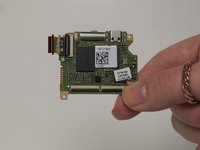
    • Remove the 4 cables connecting the motherboard to the camera body.

    • Use a plastic opening tool to help with this task.

    Vraag FixBot

    Voeg opmerking toe

Conclusie

To reassemble your device, follow these instructions in reverse order.

Annuleren: ik heb deze handleiding niet afgemaakt.

2 andere personen hebben deze handleiding voltooid.

Jessica Bain

Lid sinds: 03/11/15

408 Reputatie

2 handleidingen geschreven

Team

Marist, Team 1-6, Laflen Spring 2015 Lid van Marist, Team 1-6, Laflen Spring 2015

MARS-LAFLEN-S15S1G6

2 Leden

8 handleidingen geschreven

3Gids Commentaar

Thanks for great info. I should add that one can also clean the sensor. Sensor is circular plate with 3 screws at back of the lens. Now the camera is like new!

compand - Antwoord Deel

Where can you buy a replacement motherboard?

Demaree Wiitala - Antwoord Deel

ST76 and ST77 are very close relatives.

As it can be seen on the parts, some are marked: ”ST77”

Paul

Paul Cohen - Antwoord Deel

Voeg opmerking toe

Weergavestatistieken:

Afgelopen 24 uren: 1

Afgelopen 7 dagen: 12

Afgelopen 30 dagen: 54

Altijd: 1,758