Ga door naar hoofdinhoud
Word lid van de reparatiegemeenschap - Account aanmaken

Samsung Instinct Antenna Replacement

Wat je nodig hebt

  1. Samsung Instinct Antenna Replacement, Battery: stap 1, afbeelding 1 van 1
    • Apply pressure to the back cover and slide it forward towards the camera.

    • Lift the back cover off the phone.

    Vraag FixBot

    Voeg opmerking toe

  2. Samsung Instinct Antenna Replacement: stap 2, afbeelding 1 van 1
    • Holding the phone firmly, use the notches to grip and lift up the battery.

    Vraag FixBot

    Voeg opmerking toe

  3. Samsung Instinct Antenna Replacement, Back Case: stap 3, afbeelding 1 van 1
    • Remove the four 4.45mm screws at the corners of the phone.

    Vraag FixBot

    Voeg opmerking toe

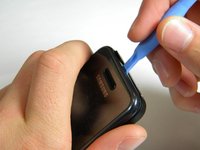
  4. Samsung Instinct Antenna Replacement: stap 4, afbeelding 1 van 2 Samsung Instinct Antenna Replacement: stap 4, afbeelding 2 van 2
    • Use the plastic opening tool to unhinge the locks around the edges of the phone.

    • Do not worry about the inner components of the phone; they are not connected to this case.

    Vraag FixBot

    Voeg opmerking toe

  5. Samsung Instinct Antenna Replacement: stap 5, afbeelding 1 van 1
    • Lift the casing off of the phone.

    Vraag FixBot

    Voeg opmerking toe

  6. Samsung Instinct Antenna Replacement, Antenna: stap 6, afbeelding 1 van 1
    • With the screws removed, locate the antenna.

    Vraag FixBot

    Voeg opmerking toe

  7. Samsung Instinct Antenna Replacement: stap 7, afbeelding 1 van 1
    • Using a Phillips head screwdriver, remove the 4.50mm screw holding the antenna in place.

    Vraag FixBot

    Voeg opmerking toe

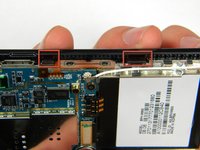
  8. Samsung Instinct Antenna Replacement: stap 8, afbeelding 1 van 1
    • Using the plastic opener tool, squeeze gently on the antenna cable connector and lift to remove the connector from its position.

    Vraag FixBot

    Voeg opmerking toe

  9. Samsung Instinct Antenna Replacement: stap 9, afbeelding 1 van 1
    • Gently lift up on the antenna and remove it from the back of the device.

    Vraag FixBot

    Voeg opmerking toe

Conclusie

To reassemble your device, follow these instructions in reverse order.

Annuleren: ik heb deze handleiding niet afgemaakt.

Jimmy Kuo

Lid sinds: 10/10/11

14 Reputatie

2 handleidingen geschreven

Team

Cal Poly, Team 3-13, Regan Fall 2011 Lid van Cal Poly, Team 3-13, Regan Fall 2011

CPSU-REGAN-F11S3G13

4 Leden

16 handleidingen geschreven

0Gids Commentaar

Voeg opmerking toe

Weergavestatistieken:

Afgelopen 24 uren: 0

Afgelopen 7 dagen: 5

Afgelopen 30 dagen: 25

Altijd: 1,304