Ga door naar hoofdinhoud
Word lid van de reparatiegemeenschap - Account aanmaken

SKYTEX SP1020 Battery Replacement

Wat je nodig hebt

  1. SKYTEX SP1020 Battery Replacement, Rear Case: stap 1, afbeelding 1 van 2 SKYTEX SP1020 Battery Replacement, Rear Case: stap 1, afbeelding 2 van 2
    • Prior to any repairs make sure that you are familiar with the device as well as the location of its buttons and ports.

    • Turn off device prior to continuing to further steps.

    Vraag FixBot

    Voeg opmerking toe

  2. SKYTEX SP1020 Battery Replacement: stap 2, afbeelding 1 van 3 SKYTEX SP1020 Battery Replacement: stap 2, afbeelding 2 van 3 SKYTEX SP1020 Battery Replacement: stap 2, afbeelding 3 van 3
    • Set the tablet back panel facing down, with the SKYTEX logo facing you. You will find that this step will start from the right side of the device.

    • Insert the plastic opening tool between the bottom seam of the back panel and the micro SD port. The tool's edge should point toward the rear panel to prevent any scratching or damage.

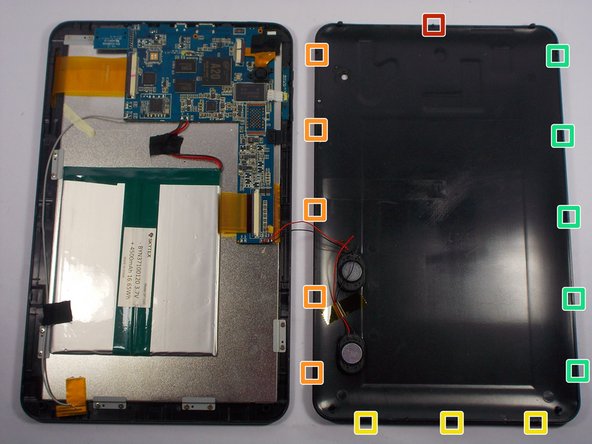
    • Follow up with the plastic opening tool, releasing the clips as you go all the way around the device.

    Vraag FixBot

    Voeg opmerking toe

  3. SKYTEX SP1020 Battery Replacement: stap 3, afbeelding 1 van 1
    • The clips will be released in the order specified as the spudger tool is moved along the seam around the device.

    Vraag FixBot

    Voeg opmerking toe

  4. SKYTEX SP1020 Battery Replacement: stap 4, afbeelding 1 van 1
    • Use a plastic opening tool to pry the speakers out of the rear case.

    • The rear case will now be free from the rest of the device.

    Vraag FixBot

    Voeg opmerking toe

  5. SKYTEX SP1020 Battery Replacement, Battery: stap 5, afbeelding 1 van 1
    • Locate the battery.

    Vraag FixBot

    Voeg opmerking toe

  6. SKYTEX SP1020 Battery Replacement: stap 6, afbeelding 1 van 1
    • Use a soldering iron and desoldering braid to desolder the red and black motherboard battery connections.

    Vraag FixBot

    Voeg opmerking toe

  7. SKYTEX SP1020 Battery Replacement: stap 7, afbeelding 1 van 1
    • Gently lift the battery up and out of the device.

    Vraag FixBot

    Voeg opmerking toe

Conclusie

To reassemble your device, follow these instructions in reverse order.

Annuleren: ik heb deze handleiding niet afgemaakt.

2 andere personen hebben deze handleiding voltooid.

Anthony Vitali

Lid sinds: 03/23/15

293 Reputatie

2 handleidingen geschreven

Team

UMass Dartmouth, Team 1-6, Miles Spring 2015 Lid van UMass Dartmouth, Team 1-6, Miles Spring 2015

UMASSD-MILES-S15S1G6

4 Leden

8 handleidingen geschreven

1Gids Commentaar

Great Instructions! where did you get the battery for the Skytex ?

joe_capozzi - Antwoord Deel

Voeg opmerking toe

Weergavestatistieken:

Afgelopen 24 uren: 0

Afgelopen 7 dagen: 7

Afgelopen 30 dagen: 29

Altijd: 1,055