Inleiding
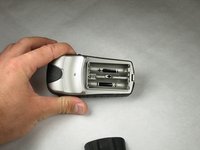
This step illustrates how to properly change the batteries for the device. In addition, this step is a prerequisite for multiple manuals regarding this device.
Wat je nodig hebt
-
-
-
Flip the device to the backside, and locate the metal tab at the center of the back cover.
 Vraag FixBot
-
-
-
-
Lift the metal tab up, and rotate it counterclockwise. This will unlock the back case cover.
-
-


To reassemble your device, follow these instructions in reverse order.
Annuleren: ik heb deze handleiding niet afgemaakt.
Één andere persoon heeft deze handleiding voltooid.

Team

Cal Poly, Team 21-30, Regan Fall 2010 Lid van Cal Poly, Team 21-30, Regan Fall 2010
CPSU-REGAN-F10S21G30
3 Leden
10 handleidingen geschreven
