Inleiding
The SD Card is required to save each photo before taking the next photo. This guide will show the proper steps to reformat the SD Card.
-
-
-
Turn the camera on by sliding the switch from the "Off" position to the "On" position. The switch is located above the touchscreen and to the left.
-
The screen will say "Sensor cleaning" once the switch is moved to "On".
 Vraag FixBot
-
-
-
Push the black button that says "Menu", located below the "ON/OFF" switch.
-
-
-
-
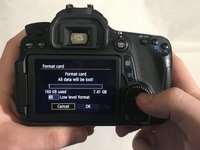
Scroll down the list using the thumb pad and select, "Format card" by pressing the center of the thumb pad labeled, "SET".
-
-
-
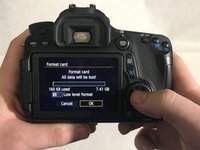
Press the right side of the thumb pad to move over the "Ok" button.
-
Once "OK" is highlighted, press the middle of thumb pad to initiate the formatting of the card.
-
-




To reassemble your device, follow these instructions in reverse order.

Team

University of Memphis, Team S2-G5, Kim Spring 2018 Lid van University of Memphis, Team S2-G5, Kim Spring 2018
UM-KIM-S18S2G5
3 Leden
15 handleidingen geschreven
