Inleiding
Is your Razer Phone having problems with the battery and you need to replace it? Follow this easy guide to replacing the battery on your phone. You'll need the #000 Phillips screw driver, the Torx head T5, the tweezers, the metal spudger and the jimmy.
Wat je nodig hebt
-
-
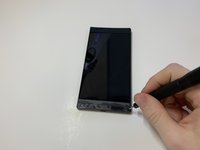
Remove the plastic speaker grills by using the metal spudger to pry underneath the strips.
-
Peel off the plastic speaker grill to reveal the screws.
 Vraag FixBot
-
-
-
Pry the top plastic grill off with the metal spudger and reveal the screws.
-
-
-
Remove five (two bottom, three top) 2.5 mm screws with the Phillips #000 screwdriver.
-
Remove five (four bottom, one top) 5.5 mm screws with the Torx Head T5 screwdriver.
-
-
-
Remove the display assembly by using the Jimmy to separate the assembly from the phone's frame.
-
Lift the display assembly away from the other half of the phone.
-
-
-
Gereedschap gebruikt in deze stap:Tweezers$4.99
-
Remove one 2.5 mm screw holding down the metal bracket connector using the Phillips #000 screwdriver.
-
Peel back the metallic shielding over the connector using tweezers.
-
Remove the metal bracket connector.
-
-
-
Grab hold of the the screen ribbon with the tweezers and remove it from the rest of the phone to free the assembly display.
-
-
Gereedschap gebruikt in deze stap:Tweezers$4.99
-
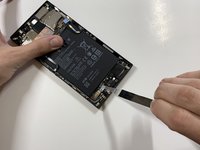
Grab hold of the connector on the right side of the phone (just above the battery) using the tweezers.
-
Remove the connector.
-
-
-
Remove the 2.5 mm screw holding down the bracket with a Phillips #000 screwdriver.
-
Grab the bracket with the tweezers and remove it.
-






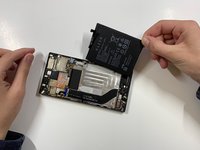
To reassemble your device, follow these instructions in reverse order.
Annuleren: ik heb deze handleiding niet afgemaakt.
5 andere personen hebben deze handleiding voltooid.

Team

Cal Poly, Team S19-G6, White Winter 2019 Lid van Cal Poly, Team S19-G6, White Winter 2019
CPSU-WHITE-W19S19G6
4 Leden
20 handleidingen geschreven
5Gids Commentaar
Hey tnx for this but how can i buy replacement battery? my battery lose energy so fast . 100 to 0 in 3 hours or less . :(
Where can I buy a battery and power button replacement for this phone
It would be nice to be able to find a batter or one that is compatible. Mine is bloated and while i can get to it easily enough i cannot find a replacement. Even a non oem that would work would be nice.
they dont have replacement batteries the only way is to buy a junk razer phone on ebay or a marketplace see if the battery is still functional and replace it as such ive had to do that and now my battery life is normal again
If you type rc30-0215 on AliExpress you’ll find the for the Razer Phone 1.
