Ga door naar hoofdinhoud
Word lid van de reparatiegemeenschap - Account aanmaken

RCA RCT6378W2 Screen Replacement

Gearchiveerde handleiding
Deze handleiding wordt enkel nog bijgehouden voor historische doeleinden. Gebruik de laatste versie van deze gids om uw reparatie uit te voeren.

Wat je nodig hebt

  1. RCA RCT6378W2 Screen Replacement, Screen Replacement: stap 1, afbeelding 1 van 1
    • Remove two 2.4mm x 4mm screws from bottom of the tablet with Phillips #00 Screwdriver.

  2. RCA RCT6378W2 Screen Replacement: stap 2, afbeelding 1 van 2 RCA RCT6378W2 Screen Replacement: stap 2, afbeelding 2 van 2
    • Remove back cover with lever tool, exposing the battery and motherboard.

  3. RCA RCT6378W2 Screen Replacement: stap 3, afbeelding 1 van 2 RCA RCT6378W2 Screen Replacement: stap 3, afbeelding 2 van 2
    Gereedschap gebruikt in deze stap:
    Tweezers
    $4.99
    • Using the tweezers, remove the black tape connecting the screen to the motherboard.

  4. RCA RCT6378W2 Screen Replacement: stap 4, afbeelding 1 van 2 RCA RCT6378W2 Screen Replacement: stap 4, afbeelding 2 van 2
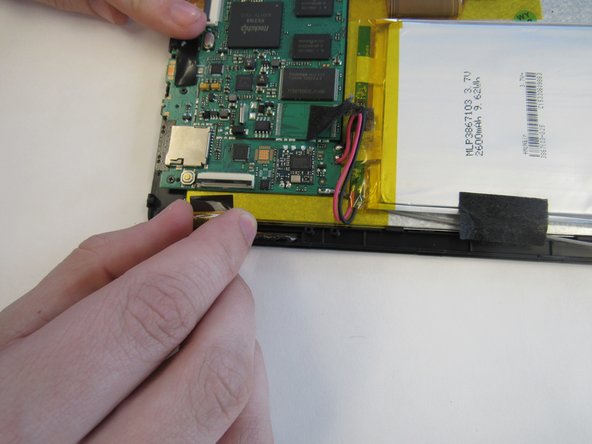
    • Pull up the switch to remove the input connector.

  5. RCA RCT6378W2 Screen Replacement: stap 5, afbeelding 1 van 1
    • Heat the iOpener in the microwave, following the instructions provided with the tool. Lay the heated iOpener on the front screen for two minutes to soften the connection of the screen to the tablet.

  6. RCA RCT6378W2 Screen Replacement: stap 6, afbeelding 1 van 2 RCA RCT6378W2 Screen Replacement: stap 6, afbeelding 2 van 2
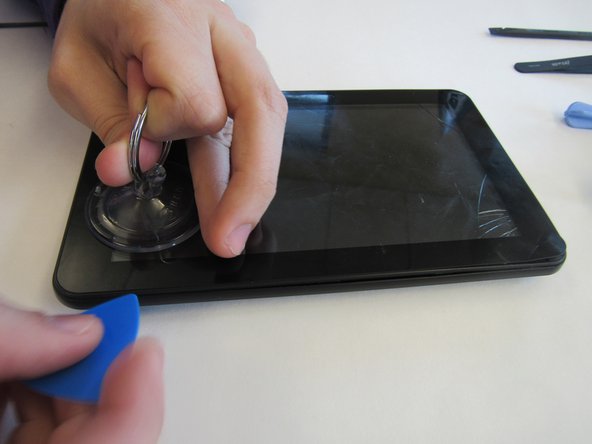
    • Use the suction cup and lever tool tool to pry the front screen from the tablet.

Conclusie

To reassemble your device, follow these instructions in reverse order.

2 andere personen hebben deze handleiding voltooid.

mikayla

Lid sinds: 01/29/15

408 Reputatie

2 handleidingen geschreven

0Gids Commentaar

Voeg opmerking toe

Weergavestatistieken:

Afgelopen 24 uren: 2

Afgelopen 7 dagen: 9

Afgelopen 30 dagen: 25

Altijd: 1,286