Ga door naar hoofdinhoud
Word lid van de reparatiegemeenschap - Account aanmaken

RCA 8 Apollo Back Panel Replacement

Wat je nodig hebt

    1. RCA 8 Apollo Back Panel Replacement, Back Panel: stap 1, afbeelding 1 van 1
      • Before you begin, discharge your tablet battery below 25%. A charged lithium-ion battery can catch fire and/or explode if accidentally punctured.

      • Power off your tablet before beginning to disassemble.

      Vraag FixBot

      Voeg opmerking toe

    2. RCA 8 Apollo Back Panel Replacement: stap 2, afbeelding 1 van 2 RCA 8 Apollo Back Panel Replacement: stap 2, afbeelding 2 van 2
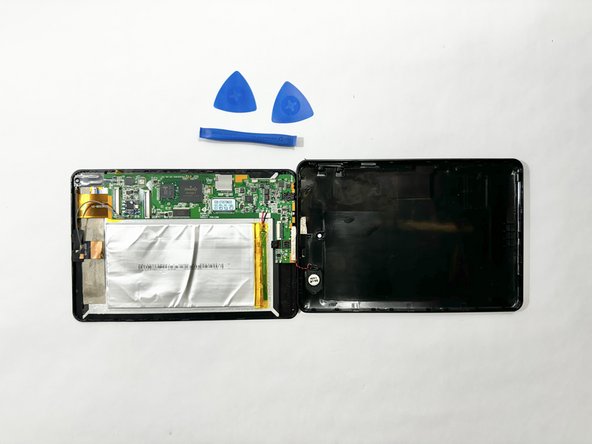
      • Insert an iFixit opening tool into the gap between the tablet and back panel.

      • Using a combination of iFixit opening tools and iFixit opening picks, pry the tablet upward around its perimeter to release it from the plastic rear case.

      • If inserted too far, an opening pick can damage your device. It is helpful to mark the edge with an opening pick, or opening tool at a depth that will not damage the inner contents of the tablet.

      Vraag FixBot

      Voeg opmerking toe

    3. RCA 8 Apollo Back Panel Replacement: stap 3, afbeelding 1 van 2 RCA 8 Apollo Back Panel Replacement: stap 3, afbeelding 2 van 2
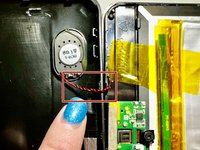
      • Disconnect the red and black speaker wires from the tablet.

      • The front and back of the tablet will be disconnected.

      Vraag FixBot

      Voeg opmerking toe

Conclusie

To reassemble your device, follow these instructions in reverse order.

Annuleren: ik heb deze handleiding niet afgemaakt.

Chantel Pfiefer

Lid sinds: 04/15/24

219 Reputatie

2 handleidingen geschreven

Team

Casper College, Team 1-1, Lareau Spring 2024 Lid van Casper College, Team 1-1, Lareau Spring 2024

CASC-LAREAU-S24S1G1

3 Leden

4 handleidingen geschreven

0Gids Commentaar

Voeg opmerking toe

Weergavestatistieken:

Afgelopen 24 uren: 0

Afgelopen 7 dagen: 0

Afgelopen 30 dagen: 3

Altijd: 194