Ga door naar hoofdinhoud
Word lid van de reparatiegemeenschap - Account aanmaken

Protocol DURA VR Remote Power Button Replacement

Wat je nodig hebt

    1. Protocol DURA VR Remote Power Button Replacement, Remote Power Button: stap 1, afbeelding 1 van 2 Protocol DURA VR Remote Power Button Replacement, Remote Power Button: stap 1, afbeelding 2 van 2
      • Remove the four 0.8mm Phillips #0 screws from the back casing of the remote.

      Vraag FixBot

      Voeg opmerking toe

    2. Protocol DURA VR Remote Power Button Replacement: stap 2, afbeelding 1 van 2 Protocol DURA VR Remote Power Button Replacement: stap 2, afbeelding 2 van 2
      • Remove the three 0.7mm Phillips #0 screws from the motherboard.

      Vraag FixBot

      Voeg opmerking toe

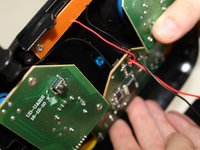
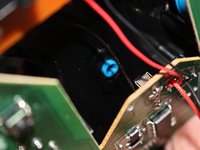
    3. Protocol DURA VR Remote Power Button Replacement: stap 3, afbeelding 1 van 2 Protocol DURA VR Remote Power Button Replacement: stap 3, afbeelding 2 van 2
      • Move the motherboard up to allow room for the power bottom to become visible and loose.

      Vraag FixBot

      Voeg opmerking toe

    4. Protocol DURA VR Remote Power Button Replacement: stap 4, afbeelding 1 van 1
      • Place the remote face up. Then pick up the broken power button and replace with a new button.

      Vraag FixBot

      Voeg opmerking toe

Conclusie

To reassemble your device, follow these instructions in reverse order.

Annuleren: ik heb deze handleiding niet afgemaakt.

Één andere persoon heeft deze handleiding voltooid.

Kayla Brown

Lid sinds: 03/22/18

491 Reputatie

4 handleidingen geschreven

0Gids Commentaar

Voeg opmerking toe

Weergavestatistieken:

Afgelopen 24 uren: 2

Afgelopen 7 dagen: 9

Afgelopen 30 dagen: 24

Altijd: 365