Ga door naar hoofdinhoud
Word lid van de reparatiegemeenschap - Account aanmaken

PowerMac G4 M5183 Graphics Card Removal

Wat je nodig hebt

  1. PowerMac G4 M5183 Graphics Card Removal, Opening PowerMac G4 M5183 Case: stap 1, afbeelding 1 van 2 PowerMac G4 M5183 Graphics Card Removal, Opening PowerMac G4 M5183 Case: stap 1, afbeelding 2 van 2
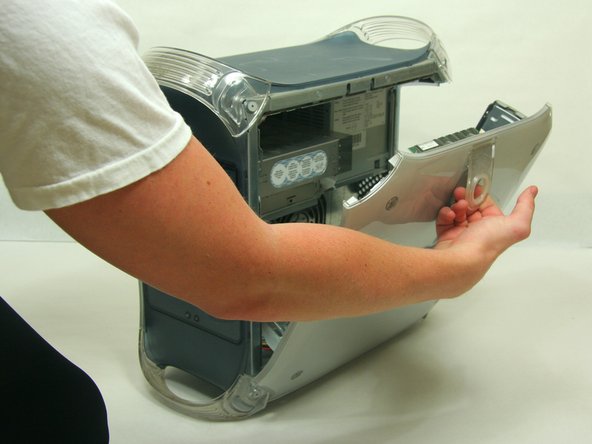
    • Pull on outer latch.

    • Lower door until it is level with your work surface.

    • Before working on the computer make sure it is not plugged into a power supply, then touch a metal object. This discharges static electricity, which could damage the computer.

  2. PowerMac G4 M5183 Graphics Card Removal, Graphics Card: stap 2, afbeelding 1 van 2 PowerMac G4 M5183 Graphics Card Removal, Graphics Card: stap 2, afbeelding 2 van 2
    • Remove the single screw with the Phillips #1 screwdriver.

    • Pull the graphics card up and out.

Eindstreep

13 andere personen hebben deze handleiding voltooid.

Justin Petrilli

Lid sinds: 01/21/10

3.168 Reputatie

11 handleidingen geschreven

Team

Cal Poly, Team 13-24, Maness Winter 2010 Lid van Cal Poly, Team 13-24, Maness Winter 2010

CPSU-MANESS-W10S13G24

4 Leden

37 handleidingen geschreven

2Gids Commentaar

Do I need to avoid static to protect the board?

Jim Robson - Antwoord Deel

Es ist eine deutsche Anleitung, aber auf der iFixit Übersicht als Englisch gekennzeichnet.

Toni Makkaroni - Antwoord Deel

Voeg opmerking toe

Weergavestatistieken:

Afgelopen 24 uren: 3

Afgelopen 7 dagen: 10

Afgelopen 30 dagen: 36

Altijd: 10,195