Ga door naar hoofdinhoud
Word lid van de reparatiegemeenschap - Account aanmaken

PowerBook 3400 M3553 RAM Replacement

Wat je nodig hebt

  1. PowerBook 3400 M3553 RAM Replacement, Battery: stap 1, afbeelding 1 van 1
    • Close the screen and turn the PowerBook over, orienting the computer upside down, using the label to guide you.

  2. PowerBook 3400 M3553 RAM Replacement: stap 2, afbeelding 1 van 2 PowerBook 3400 M3553 RAM Replacement: stap 2, afbeelding 2 van 2
    • Hold the button on the front left side and slide the battery out.

  3. PowerBook 3400 M3553 RAM Replacement, Keyboard: stap 3, afbeelding 1 van 1
    • With a Torx T8 screwdriver, remove the three Torx 24mm screws along the center of the back panel.

  4. PowerBook 3400 M3553 RAM Replacement: stap 4, afbeelding 1 van 3 PowerBook 3400 M3553 RAM Replacement: stap 4, afbeelding 2 van 3 PowerBook 3400 M3553 RAM Replacement: stap 4, afbeelding 3 van 3
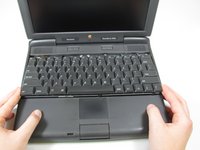
    • Turn the computer over and open the display. You should see that the keyboard is loose.

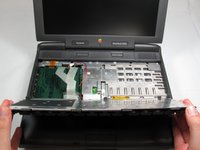
    • Before attempting to remove the keyboard, note that a ribbon cable connects the keyboard to the logic board. Improper removal may damage your keyboard.

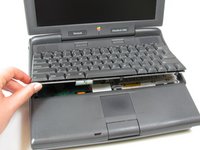
    • Slightly lift the front of the keyboard up, and slide the keyboard towards yourself.

    • Carefully lift the top half of the keyboard and pull it towards yourself.

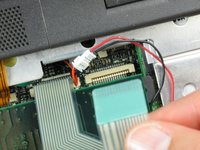
  5. PowerBook 3400 M3553 RAM Replacement: stap 5, afbeelding 1 van 2 PowerBook 3400 M3553 RAM Replacement: stap 5, afbeelding 2 van 2
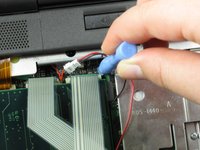
    • Loosen the ribbon cables connecting the keyboard to the computer by using a plastic opening tool to lift the tabs on either side of the cable port.

    • Gently remove the ribbons from its tabs.

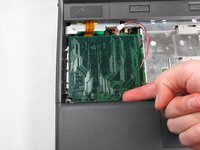
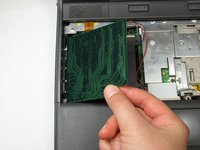
  6. PowerBook 3400 M3553 RAM Replacement, RAM: stap 6, afbeelding 1 van 2 PowerBook 3400 M3553 RAM Replacement, RAM: stap 6, afbeelding 2 van 2
    • Gently wiggle the RAM card to loosen the connection until it pulls free.

Conclusie

To install the new RAM card, follow these steps in reverse order.

2 andere personen hebben deze handleiding voltooid.

Michael Mondragon

Lid sinds: 04/12/11

397 Reputatie

9 handleidingen geschreven

Team

Cal Poly, Team 24-59, Amido Spring 2011 Lid van Cal Poly, Team 24-59, Amido Spring 2011

CPSU-AMIDO-S11S24G59

4 Leden

9 handleidingen geschreven

1Gids Commentaar

To reattach the keyboard I found it necessary to keep the kid open and push the keyboard all the way down; otherwise, the screws didn’t engage.

Scott - Antwoord

Voeg opmerking toe

Weergavestatistieken:

Afgelopen 24 uren: 0

Afgelopen 7 dagen: 5

Afgelopen 30 dagen: 19

Altijd: 2,878