Ga door naar hoofdinhoud
Word lid van de reparatiegemeenschap - Account aanmaken

PlayStation VR Processor Unit Cooling Fan Replacement

Wat je nodig hebt

  1. PlayStation VR Processor Unit Cooling Fan Replacement, Processor Unit Cooling Fan: stap 1, afbeelding 1 van 3 PlayStation VR Processor Unit Cooling Fan Replacement, Processor Unit Cooling Fan: stap 1, afbeelding 2 van 3 PlayStation VR Processor Unit Cooling Fan Replacement, Processor Unit Cooling Fan: stap 1, afbeelding 3 van 3
    • On one side of the console (the side adjacent to the fan vent), there will be two 6 mm screws. Unscrew them with a PH #000 screwdriver.

    Vraag FixBot

    Voeg opmerking toe

  2. PlayStation VR Processor Unit Cooling Fan Replacement: stap 2, afbeelding 1 van 3 PlayStation VR Processor Unit Cooling Fan Replacement: stap 2, afbeelding 2 van 3 PlayStation VR Processor Unit Cooling Fan Replacement: stap 2, afbeelding 3 van 3
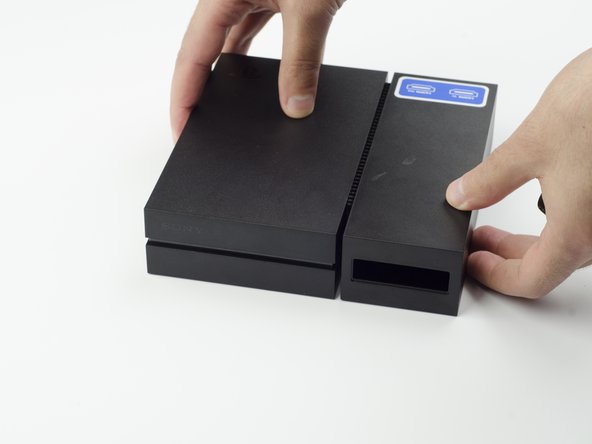
    • Press and slide the side panel (it will have the two ports) back to reveal an additional 6 mm screw.

    • Unscrew the 6mm screw with a PH #000 screwdriver.

    Vraag FixBot

    Voeg opmerking toe

  3. PlayStation VR Processor Unit Cooling Fan Replacement: stap 3, afbeelding 1 van 2 PlayStation VR Processor Unit Cooling Fan Replacement: stap 3, afbeelding 2 van 2
    • Slide the panel back into place.

    Vraag FixBot

    Voeg opmerking toe

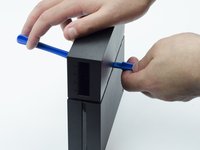
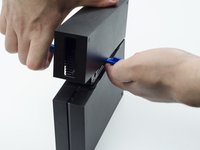
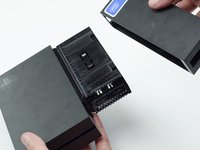
  4. PlayStation VR Processor Unit Cooling Fan Replacement: stap 4, afbeelding 1 van 3 PlayStation VR Processor Unit Cooling Fan Replacement: stap 4, afbeelding 2 van 3 PlayStation VR Processor Unit Cooling Fan Replacement: stap 4, afbeelding 3 van 3
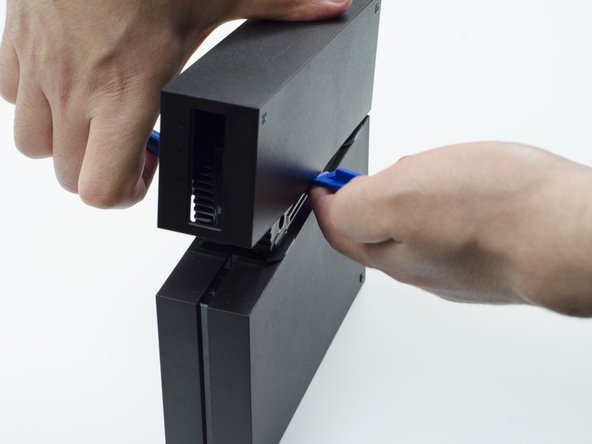
    • Using a plastic opening tool, carefully pry the panel from the main console to reveal the HDMI ports.

    • You will probably need to lift it on both sides in order for the panel to come loose.

    Vraag FixBot

    Voeg opmerking toe

  5. PlayStation VR Processor Unit Cooling Fan Replacement: stap 5, afbeelding 1 van 1
    • Turn the console over.

    • Unscrew the two 9 mm screws with a PH #000 screwdriver.

    Vraag FixBot

    Voeg opmerking toe

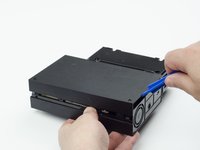
  6. PlayStation VR Processor Unit Cooling Fan Replacement: stap 6, afbeelding 1 van 2 PlayStation VR Processor Unit Cooling Fan Replacement: stap 6, afbeelding 2 van 2
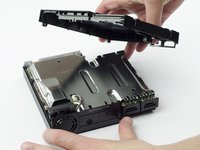
    • With the plastic opening tool, carefully pry the console shell panel free and lift it away.

    Vraag FixBot

    Voeg opmerking toe

  7. PlayStation VR Processor Unit Cooling Fan Replacement: stap 7, afbeelding 1 van 2 PlayStation VR Processor Unit Cooling Fan Replacement: stap 7, afbeelding 2 van 2
    Gereedschap gebruikt in deze stap:
    Tweezers
    $4.99
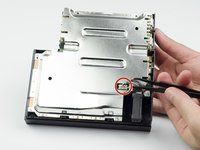
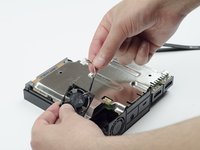
    • Using tweezers, carefully pull the multi colored bundled cable from its port connecting the fan to the console.

    • Carefully lift the fan and its wiring from the device.

    • Be mindful of damaging the wires.

    • Take care to keep your fingers away from the fan blades.

    Vraag FixBot

    Voeg opmerking toe

Conclusie

To reassemble your device, follow these instructions in reverse order.

Annuleren: ik heb deze handleiding niet afgemaakt.

8 andere personen hebben deze handleiding voltooid.

Sarah Shand

Lid sinds: 02/20/17

1.996 Reputatie

7 handleidingen geschreven

Team

USF Tampa, Team S3-G1, Sullivan Spring 2017 Lid van USF Tampa, Team S3-G1, Sullivan Spring 2017

USFT-SULLIVAN-S17S3G1

3 Leden

14 handleidingen geschreven

4Gids Commentaar

Where do I get a replacement fan tho?

Ponos King - Antwoord Deel

I think is a 3x3 cm fan, alliexpres has some, but what voltage?

crus - Antwoord Deel

5V is what i have read

Ethan Amos - Antwoord Deel

Reference for fan when I have replaced mine : DELTA ELECTRONICS MODEL : ASB0305MA-01 DC 5V 0.19A

herossuperman - Antwoord Deel

Voeg opmerking toe

Weergavestatistieken:

Afgelopen 24 uren: 1

Afgelopen 7 dagen: 21

Afgelopen 30 dagen: 94

Altijd: 10,687