Inleiding
The "Disc Read Error" is one of the most common, and possibly the most frustrating error you might encounter.
The problem occurs because dust or debris has accumulated on the lens. Luckily, it is easy to fix and takes a few short and simple steps!
Wat je nodig hebt
-
-
Use the flat edge of a metal spudger to pry the eight flat screw covers out.
-
Remove the following eight screws securing the top cover to the bottom case:
-
Four 55.4 mm Philips screws
-
Four 18.0 mm Phillips screws
 Vraag FixBot
-
-
-
Some models have a different number of screws and feet. Remove all the feet and screws in the bottom of the case.
-
The 10 screw model has 6 screws in the bottom-most portion and 4 in the upper tray.
-
-
-
-
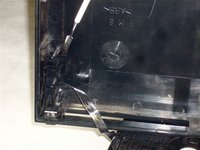
Peel the warranty sticker (located next to the main power switch) straight away from the case.
-
-
-
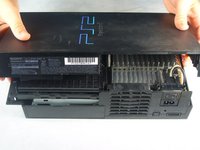
Lift the top cover off the bottom case.
-
Carefully remove the power cord that attaches the top and bottom halves by disconnecting the power cord assembly from the top case.
-
-
-
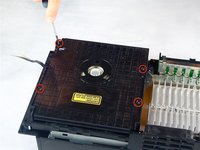
Remove the four 6.4 mm Phillips screws securing the top lid of the optical disc drive.
-
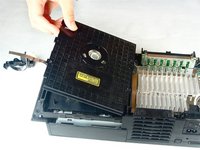
Lift and remove the lid from the optical disc drive.
-
-
-
Carefully wipe the lens in a circular motion with a rubbing alcohol damped Q-Tip.
-





To reassemble your device, follow these instructions in reverse order.
Annuleren: ik heb deze handleiding niet afgemaakt.
73 andere personen hebben deze handleiding voltooid.

Team

Cal Poly, Team 19-1, Maness Fall 2009 Lid van Cal Poly, Team 19-1, Maness Fall 2009
CPSU-MANESS-F09S19G1
4 Leden
35 handleidingen geschreven
10Gids Commentaar
I've tried the steps mentioned above to no avail. The problem persist. Anything else i can do besides purchasing another console? Sentimental value.Thank you.
What I'm gonna try and do is take a laser from a PC DVD burner tray and see if I reads things. It's a long shot but you can't break what's already broken ehh. I'll let you know what happens. And if it works I will write the proper tutorial for it:)
HOw to use a lens cleaner dvd in Ps2
please answer my problem
