Ga door naar hoofdinhoud
Word lid van de reparatiegemeenschap - Account aanmaken

Deze demontage is geen reparatiehandleiding. Om je Pixel Slate Keyboard te repareren, gebruik onze reparatiehandleidingen.

    1. Pixel Slate Keyboard Demontage, Pixel Slate Keyboard Demontage: stap 1, afbeelding 1 van 1
      • Toetsenbordpaneel met cover verwijderd

      Vraag FixBot

      Voeg opmerking toe

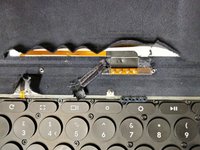
    2. Pixel Slate Keyboard Demontage: stap 2, afbeelding 1 van 1
      • Onderkant van de toetsenbordcover

      Vraag FixBot

      Voeg opmerking toe

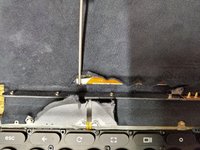
    3. Pixel Slate Keyboard Demontage: stap 3, afbeelding 1 van 1
      • Rubberen schouderknop verwijderd

      • Stof doorgesneden om de communicatiekabel bloot te leggen

      Vraag FixBot

      Voeg opmerking toe

    4. Pixel Slate Keyboard Demontage: stap 4, afbeelding 1 van 1
      • Tablethouder verwijderd om de communicatiepinnen bloot te leggen

      Vraag FixBot

      Voeg opmerking toe

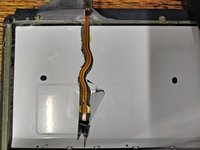
    5. Pixel Slate Keyboard Demontage: stap 5, afbeelding 1 van 3 Pixel Slate Keyboard Demontage: stap 5, afbeelding 2 van 3 Pixel Slate Keyboard Demontage: stap 5, afbeelding 3 van 3
      • FFC (flexibele platte kabel) boven het toetsenbord

      • FFC onder de metalen balk

      • FFC onder het toetsenbord

      Vraag FixBot

      Voeg opmerking toe

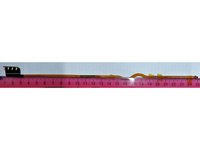
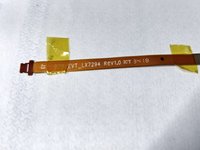
    6. Pixel Slate Keyboard Demontage: stap 6, afbeelding 1 van 2 Pixel Slate Keyboard Demontage: stap 6, afbeelding 2 van 2
      • FFC-afmetingen

      • FFC-identificatie

      • P.S. Sorry voor de lege ruimte in de afbeeldingen, ik moest het canvas opvullen om ze hier te kunnen uploaden.

      Vraag FixBot

      Voeg opmerking toe

Paul

Lid sinds: 07/22/21

178 Reputatie

1 Handleiding geschreven

5Gids Commentaar

It still bums me out that we can't figure out a repair for this. At this point adding a USB C plug to it would make me happy

Matthew U - Antwoord Deel

Mine snapped at the weak point in the hinge. You can just about see it in the last image.

Paul - Antwoord Deel

I think mine might be loose because I do get random connections but the backlit keyboard is gone. Would a USB type-c adapter be something that's possible at this point? Maybe Gemini can figure it out lol

Jona - Antwoord Deel

Sorry Jona, I've not looked into what would be needed to add a USB-C port. Perhaps you could do some research and report on anything you find?

If you're getting random connections it's likely that the cable is at least partially snapped such that not all of the copper traces are connected at all times. This happened to me shortly before it broke fully.

Paul - Antwoord Deel

It has been found that the keyboard uses a standard USB connection wired up to the pogo pins. It's almost like if the cable was not routed under the metal bar, it probably would have been better off. You could locate the broken traces and scrape away the orange plastic gently and solder in a patch. You could also make a patch cable with regular thin cable too, but it's a very small microscope and exacto blade soldering job.

Vince - Antwoord Deel

Voeg opmerking toe

Weergavestatistieken:

Afgelopen 24 uren: 0

Afgelopen 7 dagen: 7

Afgelopen 30 dagen: 52

Altijd: 1,501