Ga door naar hoofdinhoud
Word lid van de reparatiegemeenschap - Account aanmaken

Pentax PZ-10 Button Replacement

Wat je nodig hebt

    1. Pentax PZ-10 Button Replacement, Top Cover: stap 1, afbeelding 1 van 1
      • The top cover is one piece encasing the top of the device except the shutter release button and flash.

      Vraag FixBot

      Voeg opmerking toe

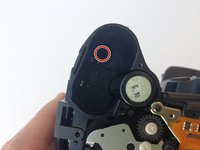
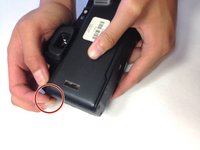
    2. Pentax PZ-10 Button Replacement, Removing Upper Right Housing Screw: stap 2, afbeelding 1 van 2 Pentax PZ-10 Button Replacement, Removing Upper Right Housing Screw: stap 2, afbeelding 2 van 2
      • With the camera lens face down, locate the screw under the overhanging piece of the top casing on the right side of the back panel.

      • Using the J0 screwdriver, remove the 6.3 mm screw.

      Vraag FixBot

      Voeg opmerking toe

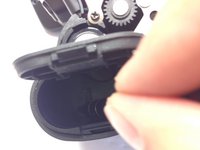
    3. Pentax PZ-10 Button Replacement, Removing Screw in Battery Compartment: stap 3, afbeelding 1 van 2 Pentax PZ-10 Button Replacement, Removing Screw in Battery Compartment: stap 3, afbeelding 2 van 2
      • Locate the next screw by holding the camera upside down with the battery compartment empty and face up.

      • Remove the 6.3 mm screw using a J0 screwdriver.

      Vraag FixBot

      Voeg opmerking toe

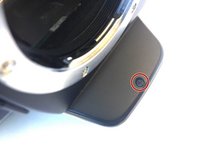
    4. Pentax PZ-10 Button Replacement, Removing Screw Under Flash Bulb: stap 4, afbeelding 1 van 2 Pentax PZ-10 Button Replacement, Removing Screw Under Flash Bulb: stap 4, afbeelding 2 van 2
      • The next screw is found in the overhanging piece just above the lens.

      • With the top of the camera facing down, remove the 3.4 mm screw with a J0 screwdriver.

      Vraag FixBot

      Voeg opmerking toe

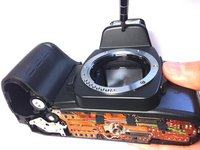
    5. Pentax PZ-10 Button Replacement, Pulling Off the Top Cover: stap 5, afbeelding 1 van 2 Pentax PZ-10 Button Replacement, Pulling Off the Top Cover: stap 5, afbeelding 2 van 2
      • Gently pull off the top cover with your hands by pulling on the tab on the left of the camera.

      Vraag FixBot

      Voeg opmerking toe

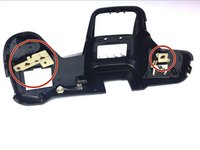
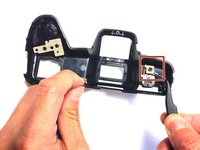
    1. Pentax PZ-10 Button Replacement, Locate Rubber Tabs: stap 6, afbeelding 1 van 2 Pentax PZ-10 Button Replacement, Locate Rubber Tabs: stap 6, afbeelding 2 van 2
      Gereedschap gebruikt in deze stap:
      Tweezers
      $4.99
      • Gently remove the beige rubber tabs from under the casing by pulling each down using tweezers.

      Vraag FixBot

      Voeg opmerking toe

    2. Pentax PZ-10 Button Replacement: stap 7, afbeelding 1 van 1
      • Remove the 3 buttons by pushing them from under the casing out through the top.

      • Each button is slotted differently, so pay attention to the orientation of each piece.

      Vraag FixBot

      Voeg opmerking toe

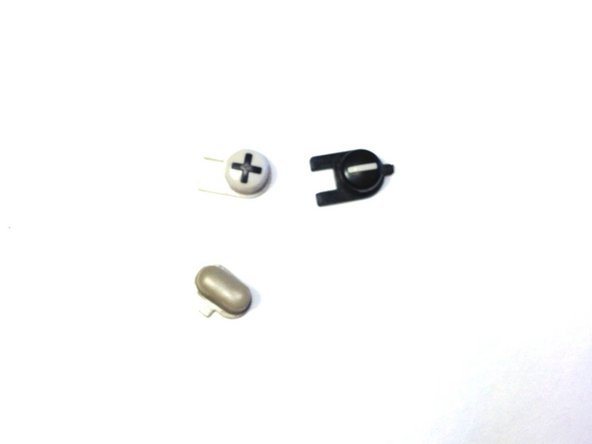
    3. Pentax PZ-10 Button Replacement, Buttons: stap 8, afbeelding 1 van 1
      • The buttons are now free to be replaced or cleaned.

      Vraag FixBot

      Voeg opmerking toe

Conclusie

To reassemble your device, follow these instructions in reverse order.

Annuleren: ik heb deze handleiding niet afgemaakt.

Jonathan Diaz

Lid sinds: 04/20/15

213 Reputatie

2 handleidingen geschreven

0Gids Commentaar

Voeg opmerking toe

Weergavestatistieken:

Afgelopen 24 uren: 2

Afgelopen 7 dagen: 8

Afgelopen 30 dagen: 19

Altijd: 847