Ga door naar hoofdinhoud
Word lid van de reparatiegemeenschap - Account aanmaken

Pebble Time Battery Replacement

Wat je nodig hebt

  1. Pebble Time Battery Replacement, Screen Cover: stap 1, afbeelding 1 van 1
    • Lay the watch flat on your workstation.

    Vraag FixBot
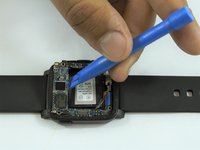
  2. Pebble Time Battery Replacement: stap 2, afbeelding 1 van 2 Pebble Time Battery Replacement: stap 2, afbeelding 2 van 2
    • Use the metal spudger to carefully pull apart the screen cover from the case.

    • Replace the metal spudger with a plastic opening tool to hold the cover open.

    Vraag FixBot
  3. Pebble Time Battery Replacement: stap 3, afbeelding 1 van 1
    • Use the metal spudger tool to carefully loosen the rest of the cover.

    Vraag FixBot
  4. Pebble Time Battery Replacement: stap 4, afbeelding 1 van 1
    • Carefully, pull apart the cover with the plastic opening tool.

    Vraag FixBot
  5. Pebble Time Battery Replacement, Screen: stap 5, afbeelding 1 van 1
    • Insert metal spudger into the side of the screen shown in the picture.

    Vraag FixBot
  6. Pebble Time Battery Replacement: stap 6, afbeelding 1 van 1
    • Use the metal spudger to pry the screen up.

    Vraag FixBot
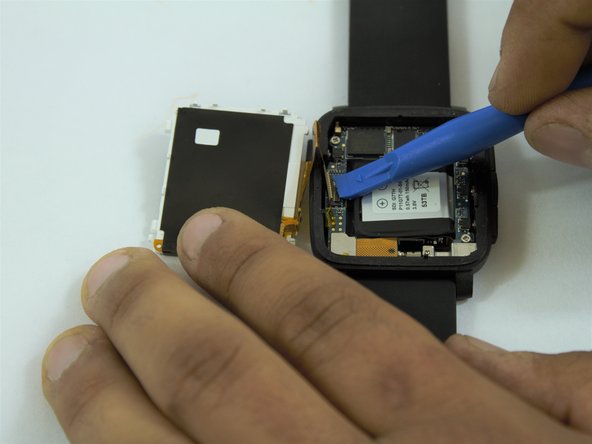
  7. Pebble Time Battery Replacement: stap 7, afbeelding 1 van 3 Pebble Time Battery Replacement: stap 7, afbeelding 2 van 3 Pebble Time Battery Replacement: stap 7, afbeelding 3 van 3
    • Once screen is lifted, insert plastic opening tool between the screen connector and circuit board.

    • Disconnect the screen from the circuit board.

    Vraag FixBot
  8. Pebble Time Battery Replacement, Circuit Board: stap 8, afbeelding 1 van 1
    • Keep the watch flat on your workstation.

    Vraag FixBot
  9. Pebble Time Battery Replacement: stap 9, afbeelding 1 van 1
    • Locate the three screws on the circuit board.

    • Remove using the J000 Philips head screwdriver.

    Vraag FixBot
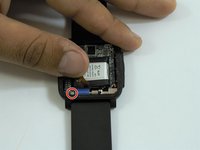
  10. Pebble Time Battery Replacement: stap 10, afbeelding 1 van 3 Pebble Time Battery Replacement: stap 10, afbeelding 2 van 3 Pebble Time Battery Replacement: stap 10, afbeelding 3 van 3
    • Carefully disconnect the connector wire on the bottom left edge of the circuit board using a plastic opener tool.

    • Move apart the connector to expose the fourth screw.

    Vraag FixBot
  11. Pebble Time Battery Replacement: stap 11, afbeelding 1 van 1
    • Remove the final screw from the circuit board with a J000 Philips head screwdriver.

    Vraag FixBot
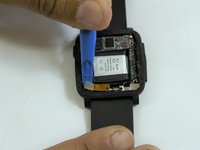
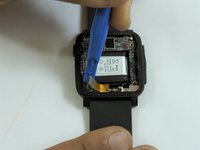
  12. Pebble Time Battery Replacement: stap 12, afbeelding 1 van 2 Pebble Time Battery Replacement: stap 12, afbeelding 2 van 2
    • Turn the watch to the side and use the plastic opening tool to lift up the circuit board.

    • Remove the circuit board from the case.

    Vraag FixBot
  13. Pebble Time Battery Replacement, Battery: stap 13, afbeelding 1 van 1
    • After removing the circuit board, the battery is located in the middle of the case.

    Vraag FixBot
  14. Pebble Time Battery Replacement: stap 14, afbeelding 1 van 2 Pebble Time Battery Replacement: stap 14, afbeelding 2 van 2
    • Locate the battery connector on the left side of the case.

    • Carefully disconnect the wire using a metal spudger.

    Vraag FixBot
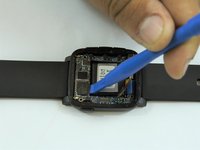
  15. Pebble Time Battery Replacement: stap 15, afbeelding 1 van 2 Pebble Time Battery Replacement: stap 15, afbeelding 2 van 2
    • After disconnecting the battery use the plastic opening tool to lift the battery off of the case.

    • The battery might be glued to the case.

    Vraag FixBot
Conclusie

To reassemble your device, follow these instructions in reverse order.

35 andere personen hebben deze handleiding voltooid.

Nicolas Hempe

Lid sinds: 02/15/17

1.516 Reputatie

5 handleidingen geschreven

Team

USF Tampa, Team 1-3, Sullivan Spring 2017 Lid van USF Tampa, Team 1-3, Sullivan Spring 2017

USFT-SULLIVAN-S17S1G3

4 Leden

10 handleidingen geschreven

12Gids Commentaar

Where did you purchase the replacement battery?

Dimas Caparros - Antwoord Deel

Got mine on Amazon

kwojdak - Antwoord Deel

What is everyone using for sticky tape to hold the bezel/crystal on that will ensure the pebble is still waterproof?

Shannon Oswald - Antwoord Deel

Attempted this using RTV Silicon, and it is %#*@ difficult to not get it EVERYWHERE! I got some on my LCD, now I’m looking for another Pebble. Just use a little superglue on the outside and don’t figure on it being waterproof anymore - I guess.

Shannon Oswald - Antwoord Deel

There’s a lot of replacement battery on internet. Just search “150mAh P11G7T-01-S01”.

Xie Yanbo - Antwoord Deel

Voeg opmerking toe

Weergavestatistieken:

Afgelopen 24 uren: 14

Afgelopen 7 dagen: 50

Afgelopen 30 dagen: 230

Altijd: 27,257