Ga door naar hoofdinhoud
Word lid van de reparatiegemeenschap - Account aanmaken

Panasonic ARC ES-LT3N Battery Replacement

Wat je nodig hebt

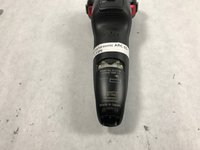
  1. Panasonic ARC ES-LT3N Battery Replacement, Back Casing: stap 1, afbeelding 1 van 2 Panasonic ARC ES-LT3N Battery Replacement, Back Casing: stap 1, afbeelding 2 van 2
    • Flip the razor over so the back is facing you.

    Vraag FixBot
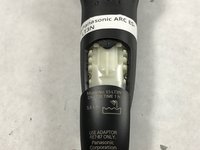
  2. Panasonic ARC ES-LT3N Battery Replacement: stap 2, afbeelding 1 van 2 Panasonic ARC ES-LT3N Battery Replacement: stap 2, afbeelding 2 van 2
    • Using a Phillips #00 screwdriver, remove the 6 mm screw just above the charger port.

    Vraag FixBot
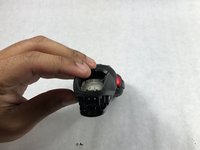
  3. Panasonic ARC ES-LT3N Battery Replacement: stap 3, afbeelding 1 van 2 Panasonic ARC ES-LT3N Battery Replacement: stap 3, afbeelding 2 van 2
    • Slide the plastic cover at the bottom of the razor downward to remove.

    Vraag FixBot
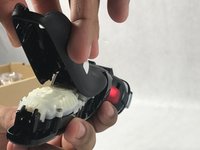
  4. Panasonic ARC ES-LT3N Battery Replacement: stap 4, afbeelding 1 van 2 Panasonic ARC ES-LT3N Battery Replacement: stap 4, afbeelding 2 van 2
    • Lift up the rear casing from the bottom of the razor.

    • This may require you to gently pry it apart with you fingers.

    • Lift up the rear casing from the sides of the razor.

    • Pull rear casing up and off razor.

    • Be careful not to break any plastic!

    Vraag FixBot
  5. Panasonic ARC ES-LT3N Battery Replacement, Battery: stap 5, afbeelding 1 van 1
    • Using the Phillips 00 driver bit, remove six screws (12mm) from the battery case.

    Vraag FixBot
  6. Panasonic ARC ES-LT3N Battery Replacement: stap 6, afbeelding 1 van 1
    • Remove battery case.

    Vraag FixBot
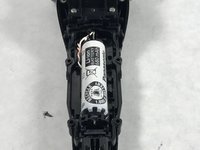
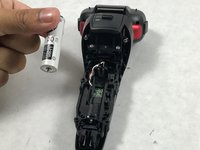
  7. Panasonic ARC ES-LT3N Battery Replacement: stap 7, afbeelding 1 van 2 Panasonic ARC ES-LT3N Battery Replacement: stap 7, afbeelding 2 van 2
    • Remove old battery by lifting the battery up and left.

    • There are plastic brackets holding the battery on the right. Removing up and left ensures that the brackets will not be damaged and the battery will not come loose.

    Vraag FixBot
Conclusie

To reassemble your device, follow these instructions in reverse order.

2 andere personen hebben deze handleiding voltooid.

Andrew Trainor

Lid sinds: 03/05/17

648 Reputatie

5 handleidingen geschreven

Team

UMass Dartmouth, Team S8-G3, Catania Spring 2017 Lid van UMass Dartmouth, Team S8-G3, Catania Spring 2017

UMASSD-CATANIA-S17S8G3

3 Leden

10 handleidingen geschreven

1Gids Commentaar

Where does one actually find the replacement batteries though?

WooKstah - Antwoord Deel

Voeg opmerking toe

Weergavestatistieken:

Afgelopen 24 uren: 3

Afgelopen 7 dagen: 11

Afgelopen 30 dagen: 72

Altijd: 2,325