Ga door naar hoofdinhoud
Word lid van de reparatiegemeenschap - Account aanmaken

NuVision Duo 11 MicroSD Port Replacement

Wat je nodig hebt

    1. NuVision Duo 11 MicroSD Port Replacement, Back Panel: stap 1, afbeelding 1 van 1
      • Place the flat end of a nylon spudger in the gap between the cover and the rest of the device.

      • Slide the spudger down each side until you hear numerous clicks.

      • Remove the back panel from the tablet.

      Vraag FixBot

      Voeg opmerking toe

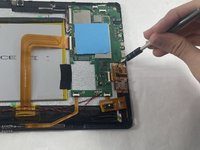
    1. NuVision Duo 11 MicroSD Port Replacement, MicroSD Port: stap 2, afbeelding 1 van 3 NuVision Duo 11 MicroSD Port Replacement, MicroSD Port: stap 2, afbeelding 2 van 3 NuVision Duo 11 MicroSD Port Replacement, MicroSD Port: stap 2, afbeelding 3 van 3
      • Remove the 4.8 mm screws from the MicroSD port using a JIS #000 screwdriver.

      • Unclip the male ribbon from the female ribbon port carefully.

      • Remove the MicroSD port from the tablet.

      Vraag FixBot

      Voeg opmerking toe

Conclusie

To reassemble your device, follow these instructions in reverse order.

Annuleren: ik heb deze handleiding niet afgemaakt.

Zachary Picard

Lid sinds: 03/16/23

157 Reputatie

2 handleidingen geschreven

Team

UMass Dartmouth, Team 7-1, Ryckebusch Spring 2023 Lid van UMass Dartmouth, Team 7-1, Ryckebusch Spring 2023

UMASSD-RYCKEBUSCH-S23S7G1

3 Leden

6 handleidingen geschreven

1Gids Commentaar

Does anyone know where the CMOS battery is located?

James Zagranis - Antwoord Deel

Voeg opmerking toe

Weergavestatistieken:

Afgelopen 24 uren: 0

Afgelopen 7 dagen: 3

Afgelopen 30 dagen: 21

Altijd: 382