Ga door naar hoofdinhoud
Word lid van de reparatiegemeenschap - Account aanmaken

Nostalgia GCM200 Power Button Replacement

Wat je nodig hebt

  1. Nostalgia GCM200 Power Button Replacement, Nostalgia GCM200 Disassembly: stap 1, afbeelding 1 van 2 Nostalgia GCM200 Power Button Replacement, Nostalgia GCM200 Disassembly: stap 1, afbeelding 2 van 2
    • Remove the two 1.3 mm Phillips #2 screws.

    • Remove the S6 spanner screw.

    • Carefully place these three screws somewhere safe to use later in reassembly.

    Vraag FixBot

    Voeg opmerking toe

  2. Nostalgia GCM200 Power Button Replacement: stap 2, afbeelding 1 van 1
    • Split the device in half to expose the internal parts of the device.

    • Again, there are two more Phillips screws to remove.

    Vraag FixBot

    Voeg opmerking toe

  3. Nostalgia GCM200 Power Button Replacement: stap 3, afbeelding 1 van 1
    • Remove the two screws from both sides of the heating coil.

    Vraag FixBot

    Voeg opmerking toe

  4. Nostalgia GCM200 Power Button Replacement, Power Button: stap 4, afbeelding 1 van 1
    • Split the device into 2 parts to change the power button.

    • Power button hold the other parts, so be careful.

    Vraag FixBot

    Voeg opmerking toe

  5. Nostalgia GCM200 Power Button Replacement: stap 5, afbeelding 1 van 1
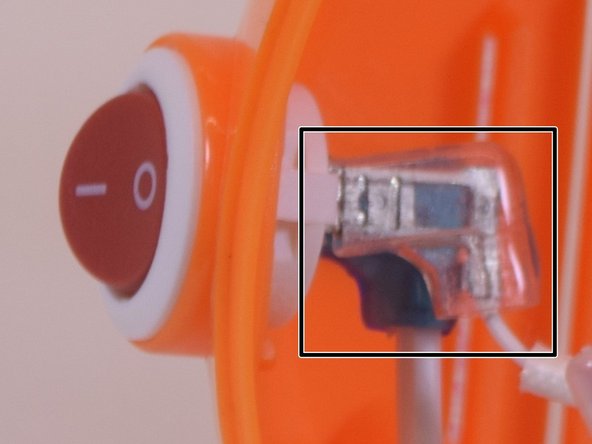
    • Remove (flexible) plastic sleeves from the inside end of the power cable.

    • You might want to use force, pull out while shaking it.

    • Inside the product, ensure you look at the power button and try to understand this step before you take action. There are two notches, push them at the same time on both sides to push the button out of the device.

    Vraag FixBot

    Voeg opmerking toe

  6. Nostalgia GCM200 Power Button Replacement: stap 6, afbeelding 1 van 1
    • Depress the little tab inside the top portion of the device to remove the On/Off switch.

    Vraag FixBot

    Voeg opmerking toe

  7. Nostalgia GCM200 Power Button Replacement: stap 7, afbeelding 1 van 1
    • Replace the power button, and put the plastic sleeves in the original position.

    • Great, you just finished replacing power button

    Vraag FixBot

    Voeg opmerking toe

  8. Nostalgia GCM200 Power Button Replacement: stap 8, afbeelding 1 van 1
    • To reassemble your device, follow these instructions in reverse order.

    Vraag FixBot

    Voeg opmerking toe

Conclusie

This guide will help you to replace the power button

Annuleren: ik heb deze handleiding niet afgemaakt.

3 andere personen hebben deze handleiding voltooid.

Xingdi Zhou

Lid sinds: 06/27/17

466 Reputatie

3 handleidingen geschreven

Team

UW Tacoma, Team S1-G4, Liner Summer 2017 Lid van UW Tacoma, Team S1-G4, Liner Summer 2017

UWT-LINER-SU17S1G4

4 Leden

5 handleidingen geschreven

0Gids Commentaar

Voeg opmerking toe

Weergavestatistieken:

Afgelopen 24 uren: 2

Afgelopen 7 dagen: 5

Afgelopen 30 dagen: 31

Altijd: 394