Ga door naar hoofdinhoud
Word lid van de reparatiegemeenschap - Account aanmaken

Nokia 6590i SIM Card Replacement

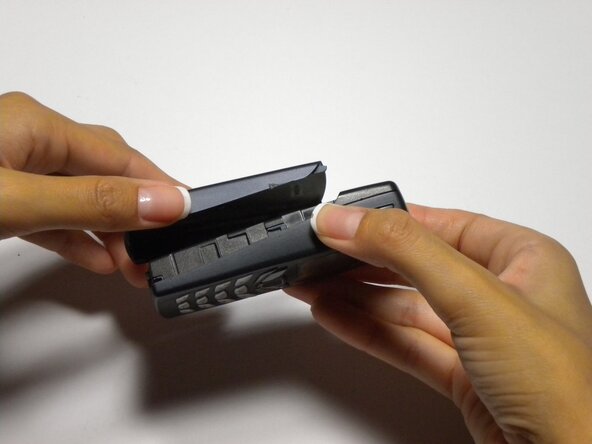
  1. Nokia 6590i SIM Card Replacement, Battery: stap 1, afbeelding 1 van 2 Nokia 6590i SIM Card Replacement, Battery: stap 1, afbeelding 2 van 2
    • Press the button on the bottom of the rear cover.

    • Keep the button pressed while pulling the cover downward to remove the back cover.

    • Lift the cover off.

  2. Nokia 6590i SIM Card Replacement: stap 2, afbeelding 1 van 1
    • Push the battery down from the top and pull it out.

  3. Nokia 6590i SIM Card Replacement, SIM Card: stap 3, afbeelding 1 van 1
    • Open the small door covering The SIM card by pulling down from the top

  4. Nokia 6590i SIM Card Replacement: stap 4, afbeelding 1 van 1
    • Lift the SIM card out of the phone

Conclusie

To reassemble your device, follow these instructions in reverse order.

Colby Leslie

Lid sinds: 10/05/10

13 Reputatie

7 handleidingen geschreven

Team

Cal Poly, Team 22-3, Maness Fall 2010 Lid van Cal Poly, Team 22-3, Maness Fall 2010

CPSU-MANESS-F10S22G3

4 Leden

9 handleidingen geschreven

0Gids Commentaar

Voeg opmerking toe

Weergavestatistieken:

Afgelopen 24 uren: 0

Afgelopen 7 dagen: 4

Afgelopen 30 dagen: 6

Altijd: 1,106