Ga door naar hoofdinhoud
Word lid van de reparatiegemeenschap - Account aanmaken

Nokia 6086 Screen Replacement

Wat je nodig hebt

  1. Nokia 6086 Screen Replacement, Battery: stap 1, afbeelding 1 van 1
    • Turn off the phone.

    • Check if there is a microSD card in the slot behind the door on the side. If so, remove it by first pushing it in, then pulling it out.

    • Position the phone so that the back side is in view.

    Vraag FixBot

    Voeg opmerking toe

  2. Nokia 6086 Screen Replacement: stap 2, afbeelding 1 van 3 Nokia 6086 Screen Replacement: stap 2, afbeelding 2 van 3 Nokia 6086 Screen Replacement: stap 2, afbeelding 3 van 3
    • Remove the back battery cover.

    • Apply pressure on the cover while simultaneously sliding the cover downward.

    Vraag FixBot

    Voeg opmerking toe

  3. Nokia 6086 Screen Replacement: stap 3, afbeelding 1 van 3 Nokia 6086 Screen Replacement: stap 3, afbeelding 2 van 3 Nokia 6086 Screen Replacement: stap 3, afbeelding 3 van 3
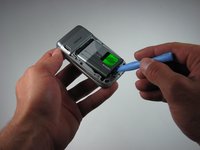
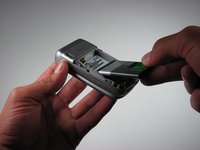
    • Insert the iPod opening tool between the base of the phone and the phone battery.

    • Position the phone so that the battery won't fall out of the phone.

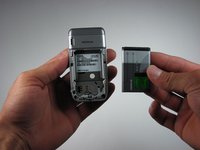
    • The battery lifts out of the phone fast and easily.

    • Carefully lift the battery out of the phone.

    Vraag FixBot

    Voeg opmerking toe

  4. Nokia 6086 Screen Replacement, Top Front Cover: stap 4, afbeelding 1 van 1
    • Close the phone.

    • Face the front cover forward.

    Vraag FixBot

    Voeg opmerking toe

  5. Nokia 6086 Screen Replacement: stap 5, afbeelding 1 van 2 Nokia 6086 Screen Replacement: stap 5, afbeelding 2 van 2
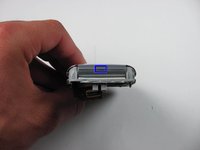
    • Locate the 4.5 mm notch at the top of the phone.

    • Place the iPod opening tool into the opening.

    • Slightly prop up the top section by lifting the tool.

    Vraag FixBot

    Voeg opmerking toe

  6. Nokia 6086 Screen Replacement: stap 6, afbeelding 1 van 3 Nokia 6086 Screen Replacement: stap 6, afbeelding 2 van 3 Nokia 6086 Screen Replacement: stap 6, afbeelding 3 van 3
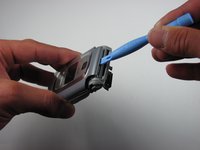
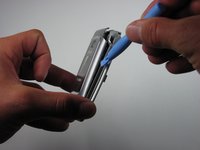
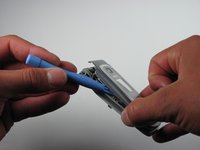
    • Wedge the iPod opening tool between the top cover and the phone.

    • Gently lift the top cover away from the phone using the iPod opening tool.

    • This unlatches each hook that connects the top cover to the phone.

    • Repeat for both the left and the right sides of the phone.

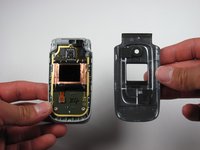
    • Place the top cover aside once the top cover is completely disconnected from the phone.

    Vraag FixBot

    Voeg opmerking toe

  7. Nokia 6086 Screen Replacement, Screen: stap 7, afbeelding 1 van 3 Nokia 6086 Screen Replacement, Screen: stap 7, afbeelding 2 van 3 Nokia 6086 Screen Replacement, Screen: stap 7, afbeelding 3 van 3
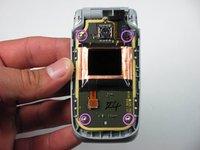
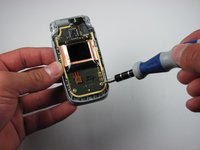
    • Locate the four screws on the phone.

    • The top right screw is located under the black connector piece.

    • To remove the connector piece gently lift it off of its connector.

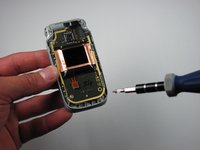
    • Take the T6 driver and remove the screws.

    Vraag FixBot

    Voeg opmerking toe

  8. Nokia 6086 Screen Replacement: stap 8, afbeelding 1 van 1
    • Carefully lift up the motherboard.

    Vraag FixBot

    Voeg opmerking toe

  9. Nokia 6086 Screen Replacement: stap 9, afbeelding 1 van 2 Nokia 6086 Screen Replacement: stap 9, afbeelding 2 van 2
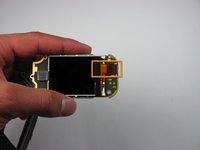
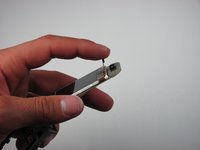
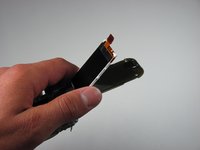
    • Find the orange slip on the motherboard.

    • Peel back the orange slip to expose the screen.

    Vraag FixBot

    Voeg opmerking toe

  10. Nokia 6086 Screen Replacement: stap 10, afbeelding 1 van 3 Nokia 6086 Screen Replacement: stap 10, afbeelding 2 van 3 Nokia 6086 Screen Replacement: stap 10, afbeelding 3 van 3
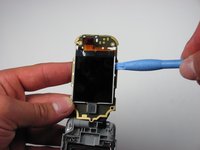
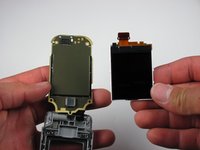
    • Place the ipod opening tool under the screen.

    • Remove the damaged screen with the ipod opening tool.

    Vraag FixBot

    Voeg opmerking toe

Conclusie

To reassemble your device, follow these instructions in reverse order.

Annuleren: ik heb deze handleiding niet afgemaakt.

Één andere persoon heeft deze handleiding voltooid.

Caitlin Rahm

Lid sinds: 04/15/10

78 Reputatie

4 handleidingen geschreven

Team

Cal Poly, Team 26-30, Regan Spring 2010 Lid van Cal Poly, Team 26-30, Regan Spring 2010

CPSU-REGAN-S10S26G30

4 Leden

18 handleidingen geschreven

0Gids Commentaar

Voeg opmerking toe

Weergavestatistieken:

Afgelopen 24 uren: 4

Afgelopen 7 dagen: 17

Afgelopen 30 dagen: 75

Altijd: 3,803