Ga door naar hoofdinhoud
Word lid van de reparatiegemeenschap - Account aanmaken

Nokia 6010 screen and speaker replacement

Wat je nodig hebt

  1. Nokia 6010 screen and speaker replacement, Battery: stap 1, afbeelding 1 van 3 Nokia 6010 screen and speaker replacement, Battery: stap 1, afbeelding 2 van 3 Nokia 6010 screen and speaker replacement, Battery: stap 1, afbeelding 3 van 3
    • Press the small tab on the bottom of the back of the phone.

    • Push the back case upward towards the power button. The back case will then pop off.

    • It requires some force, so be careful.

    Vraag FixBot

    Voeg opmerking toe

  2. Nokia 6010 screen and speaker replacement: stap 2, afbeelding 1 van 2 Nokia 6010 screen and speaker replacement: stap 2, afbeelding 2 van 2
    • Lift the battery near the bottom and pry up.

    Vraag FixBot

    Voeg opmerking toe

  3. Nokia 6010 screen and speaker replacement, SIM Card: stap 3, afbeelding 1 van 1
    • With one hand, press the ridged tab near the visible side of the SIM card.

    • Slide the card out with your other hand.

    Vraag FixBot

    Voeg opmerking toe

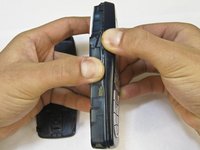
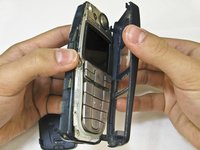
  4. Nokia 6010 screen and speaker replacement, Keypad: stap 4, afbeelding 1 van 2 Nokia 6010 screen and speaker replacement, Keypad: stap 4, afbeelding 2 van 2
    • Grip the phone on either the sides, the top, or the bottom.

    • Pull the front case away from the rest of the phone.

    • There are no special tabs to keep it in place so it should wiggle free easily.

    Vraag FixBot

    Voeg opmerking toe

  5. Nokia 6010 screen and speaker replacement: stap 5, afbeelding 1 van 1
    • Lift the keypad away from the body of the phone.

    • The keypad is the rubber-backed piece with the number keys.

    Vraag FixBot

    Voeg opmerking toe

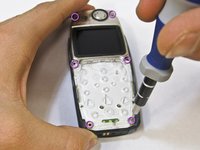
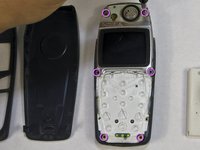
  6. Nokia 6010 screen and speaker replacement, LCD Screen and Speaker: stap 6, afbeelding 1 van 2 Nokia 6010 screen and speaker replacement, LCD Screen and Speaker: stap 6, afbeelding 2 van 2
    • Remove the six screws around the front of the phone body with a T6 screwdriver.

    Vraag FixBot

    Voeg opmerking toe

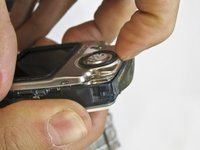
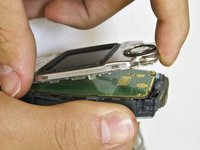
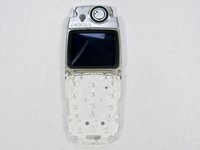
  7. Nokia 6010 screen and speaker replacement: stap 7, afbeelding 1 van 3 Nokia 6010 screen and speaker replacement: stap 7, afbeelding 2 van 3 Nokia 6010 screen and speaker replacement: stap 7, afbeelding 3 van 3
    • Insert your finger underneath the speaker piece and pry away from the phone body.

    • The plastic layer containing the LCD screen and speaker takes some force to remove.

    • There are 4 plastic tabs which keep it in place, but they are hard to press. Be careful and go tab by tab or use a spudger if you are nervous about using too much force.

    • The LCD and the speaker are attached to the same piece and must be replaced together.

    Vraag FixBot

    Voeg opmerking toe

Conclusie

To reassemble your device, follow these instructions in reverse order.

Annuleren: ik heb deze handleiding niet afgemaakt.

2 andere personen hebben deze handleiding voltooid.

Nicholas Hanne

Lid sinds: 01/20/10

129 Reputatie

8 handleidingen geschreven

Team

Cal Poly, Team 14-45, Regan Winter 2010 Lid van Cal Poly, Team 14-45, Regan Winter 2010

CPSU-REGAN-W10S14G45

5 Leden

16 handleidingen geschreven

1Gids Commentaar

Greatly appreciated !!!

Tobi Hunt - Antwoord Deel

Voeg opmerking toe

Weergavestatistieken:

Afgelopen 24 uren: 1

Afgelopen 7 dagen: 9

Afgelopen 30 dagen: 56

Altijd: 4,692