Deze vertaling is door een computer gegenereerd en is nog niet door iemand nagekeken. Spreek je deze taal? Bekijk het hier.

Nintendo GameCube voor- en achterpaneel vervangen

dcarlin en 24 andere bijdragers
Voor het laatst geüpdatet op 29 jul 2026
Bekeken: 20K
Statistieken weergeven:
- Afgelopen 24 uur:
- 4
- Afgelopen 7 dagen:
- 40
- Afgelopen 30 dagen:
- 194
- Altijd:
- 19.663
Commentaar: 9
9 comments on steps.
Voltooid: 6 7
6 mensen hebben deze handleiding als "voltooid" gemarkeerd. Ben jij de volgende?
7 personen hebben deze handleiding als "voltooid" gemarkeerd. Een daarvan ben jij—lekker bezig!
Favorieten: 8 9
8 mensen hebben deze handleiding als favoriet gemarkeerd en volgen deze. Ben jij de volgende?
9 personen hebben deze handleiding als favoriet gemarkeerd (en blijven daarmee op de hoogte van meldingen)—een daarvan ben jij!
Inleiding
Ga naar stap 1 ↓Door deze panelen te verwijderen krijg je meer toegang tot de onderdelen van de GameCube.
Wat je nodig hebt
Gereedschap


-
-
-
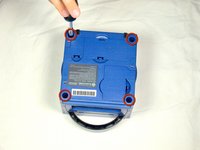
Draai de GameCube om zodat de onderkant naar boven wijst.
-
Gebruik de 4,5 mm Gamebit-schroevendraaier om alle vier de schroeven te verwijderen.
 Vraag FixBot
-
-
-
Met de onderkant van de GameCube naar boven gericht en de schroeven verwijderd, trekt u voorzichtig de buitenste behuizing van het apparaat weg van de bovenste helft.
-
Verplaats de GameCube zodat de binnenkant naar boven is gericht.
-
-
-
-
-
Druk voorzichtig op de clips aan beide kanten van het achterpaneel.
-
Verwijder voorzichtig het achterpaneel van de GameCube.
-
-
-
-
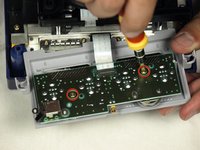
Gebruik een Phillips #2-schroevendraaier om de twee schroeven aan de achterkant van de controlepoort te verwijderen.
-
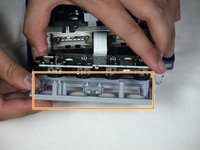
Scheid voorzichtig de grijze buitenbehuizing van de controlepoort en de printplaat.
-
-




Volg deze instructies in omgekeerde volgorde om het apparaat weer in elkaar te zetten.
Annuleren: ik heb deze handleiding niet afgemaakt.
6 andere personen hebben deze handleiding voltooid.

Team

Cal Poly, Team 6-2, Maness Fall 2009 Lid van Cal Poly, Team 6-2, Maness Fall 2009
CPSU-MANESS-F09S6G2
4 Leden
96 handleidingen geschreven
