Ga door naar hoofdinhoud
Word lid van de reparatiegemeenschap - Account aanmaken

Ninja Master Prep QB900B button replacement

Wat je nodig hebt

  1. Ninja Master Prep QB900B button replacement, The Ninja Master Prep QB900B: stap 1, afbeelding 1 van 1
    • Place the blender to the side.

    Vraag FixBot

    Voeg opmerking toe

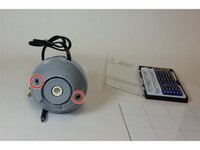
  2. Ninja Master Prep QB900B button replacement: stap 2, afbeelding 1 van 2 Ninja Master Prep QB900B button replacement: stap 2, afbeelding 2 van 2
    • Remove the two highlighted screws with a Phillips #2 Screw Driver

    • Gently pull off the top.

    Vraag FixBot

    Voeg opmerking toe

  3. Ninja Master Prep QB900B button replacement, Button: stap 3, afbeelding 1 van 1
    • Remove the highlighted screws.

    Vraag FixBot

    Voeg opmerking toe

  4. Ninja Master Prep QB900B button replacement: stap 4, afbeelding 1 van 1
    • Pull out the highlighted spring.

    • Now wash the button with soap and water, and follow the guide backwards to reassemble.

    Vraag FixBot

    Voeg opmerking toe

Conclusie

To reassemble your device, follow these instructions in reverse order.

Annuleren: ik heb deze handleiding niet afgemaakt.

2 andere personen hebben deze handleiding voltooid.

Kamal Taha

Lid sinds: 08/27/15

679 Reputatie

5 handleidingen geschreven

Team

USF Tampa, Team 1-3, Sullivan Fall 2015 Lid van USF Tampa, Team 1-3, Sullivan Fall 2015

USFT-SULLIVAN-F15S1G3

3 Leden

5 handleidingen geschreven

2Gids Commentaar

mine has different screws and they won’t come out easily. looks like it might have a star head. thought it was hex and now the screws are stripped :(

Stephen Filippone - Antwoord Deel

turns out it was a security torx. how annoying.

Stephen Filippone - Antwoord Deel

Voeg opmerking toe

Weergavestatistieken:

Afgelopen 24 uren: 1

Afgelopen 7 dagen: 1

Afgelopen 30 dagen: 21

Altijd: 2,312