Deze vertaling is door een computer gegenereerd en is nog niet door iemand nagekeken. Spreek je deze taal? Bekijk het hier.
Inleiding
Als de modusknop van je Nikon D7100 niet van cameramodus wisselt wanneer je eraan draait, gebruik dan deze handleiding om de modusknop te vervangen.
Er zijn geen speciale vaardigheden vereist om deze vervanging uit te voeren.
Zorg voordat je met deze handleiding begint dat het apparaat is uitgeschakeld en is losgekoppeld van eventuele externe voedingsbronnen.
Wat je nodig hebt
-
-
-
Verwijder de vijf schroeven aan de onderkant van de camera met een JIS #000-schroevendraaier.
 Vraag FixBot
-
-
-
Verwijder de 3 schroeven onder de batterijklep en verwijder de onderkap.
-
-
-
Verwijder de zelfklevende leren schroefafdekking en draai de 2 schroeven eronder los.
-
-
-
-
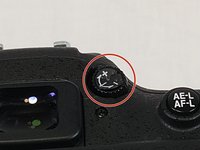
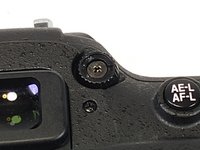
Verwijder de sticker van de dioptrie-instelknop en draai de schroef eronder los.
-
-
-
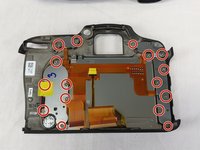
Draai vervolgens de resterende schroeven los waarmee de achterplaat aan het LCD-scherm is bevestigd.
-
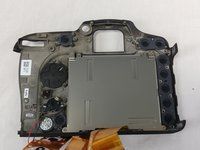
Verwijder daarna eenvoudig de plaat met het LCD-scherm.
-
-
-
-
-
Maak de 5 lintkabel-aansluitingen los door de vergrendelingen met een plastic spudger omhoog te flippen.
-
-
-
Verwijder de zwarte 4-pins (kabel)aansluiting door deze uit de (kabel)aansluiting te trekken.
-
-
-
-
-
Nadat je de handleiding hebt gevolgd om het achterste LCD-scherm van het moederbord te verwijderen, verwijder je de 2 gemarkeerde schroeven.
-
-
-
-
-
Verwijder deze 5 schroeven langs de bovenkant van de camerabehuizing.
-
-
-
Verwijder deze 2 schroeven aan de bovenkant van de camera en trek het bovenste scherm, de flitser en de instelwiel-knop uit de hoofdbehuizing van de camera.
-
-
-
Verwijder de grote schroef in het midden van de knop voor de standenkeuzeschakelaar. Hiermee kun je deze vervangen.
-
-






Volg deze instructies in omgekeerde volgorde om je apparaat weer in elkaar te zetten.
Annuleren: ik heb deze handleiding niet afgemaakt.
6 andere personen hebben deze handleiding voltooid.

Team

USF Tampa, Team S11-G6, Cheng Spring 2018 Lid van USF Tampa, Team S11-G6, Cheng Spring 2018
USFT-CHENG-S18S11G6
4 Leden
50 handleidingen geschreven
7Gids Commentaar
Thanks for the write up! I just used it to replace my D7100 mode dial.
One caveat, in step 19, there are no screws under the circles that are drawn. Those screws were removed to get the LCD off, I ended up removing several other screws (some unnecessarily I believe) before I was able to get the top panel to separate from the main body.
There are 2 screws on the sides that definitely need to be removed as they clearly hold the top panel to the body. One of these is visible underneath the strap retainer in photo 18. The other one is the same location on the SD card slot side of the body.
edit - I’m also unsure why this shows how to remove the LCD from the back plate as this is unnecessary for replacing the mode dial.
Many thanks for a good clear guide! I used steps 1 to 10 to remove the base and back so that I could change out the worn buttons around the display. The only problem I had was reconnecting the ribbon cables. After a bit of research I found that you need to flip up the dark grey tabs on the ribbon cable connectors with your fingernail to release the clamps before removing the cables. When reassembling ensure the cables are fully reinserted then push the tabs back down to lock.
My D7200 plate indicator popped off, I just bought the new switch / replacement switch, gently popped off the indicator plate (to know what mode you’re in) and reglued it onto my old rotating dial.
My rotating switch IS broken though, in the sense that it will rotate from indent to indent and the push down switch doesn’t stop it, but I don’t care. It stays where it’s supposed to and I always check what mode I’m in anyways before starting.
I did NOT want to go through the steps above to disassemble my camera, just for the indicator plate. Not worth it.
