Deze vertaling is door een computer gegenereerd en is nog niet door iemand nagekeken. Spreek je deze taal? Bekijk het hier.
Inleiding
Is het glas van je Nextbook 8-scherm gebroken? Gebruik deze handleiding om het glas aan de voorkant van het scherm te vervangen.
Wat je nodig hebt
-
-
-
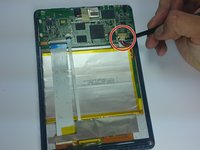
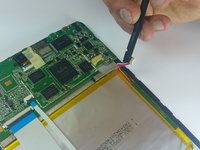
Gebruik het plastic Openingsgereedschap om de achterbehuizing te verwijderen. Schuif het gereedschap voorzichtig tussen het glas aan de voorzijde en de achterbehuizing.
-
Schuif het gereedschap langs de rand om de achterbehuizing los te maken.
 Vraag FixBot
-
-
-
Verwijder de tape die het moederbord bedekt.
-
Verwijder de zilveren tape die de witte lintkabels aan de batterij bevestigt.
-
-
-
Gebruik een spudger om de (kabel)aansluiting van de batterij voorzichtig los te koppelen van het moederbord.
-
-
Gereedschap gebruikt in deze stap:Tweezers$4.99
-
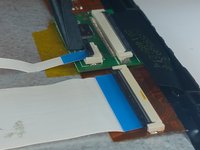
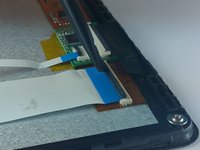
Gebruik een spudger om het zwarte klepje van de twee ZIF-aansluitingen boven de accu omhoog te wippen.
-
Trek de lintkabels uit de aansluitingen met een pincet of twee vingers.
-
-
-
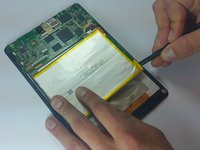
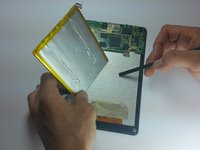
Gebruik de platte kant van een spudger en werk de spudger voorzichtig onder de batterij om deze van het apparaat los te tillen.
-
-
-
-
-
-
Verwijder de zilverkleurige en goudkleurige sticker aan de onderkant van het apparaat.
-
-
Gereedschap gebruikt in deze stap:Tweezers$4.99
-
Gebruik een spudger om de zwarte lipjes op de drie ZIF-aansluitingen omhoog te wippen.
-
Gebruik een ESD-veilige pincet om de lintkabels uit de drie (kabel)aansluitingen te trekken.
-
-
-
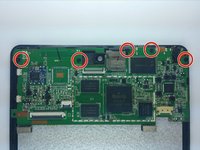
Verwijder de 5 zwarte schroeven op het moederbord.
-
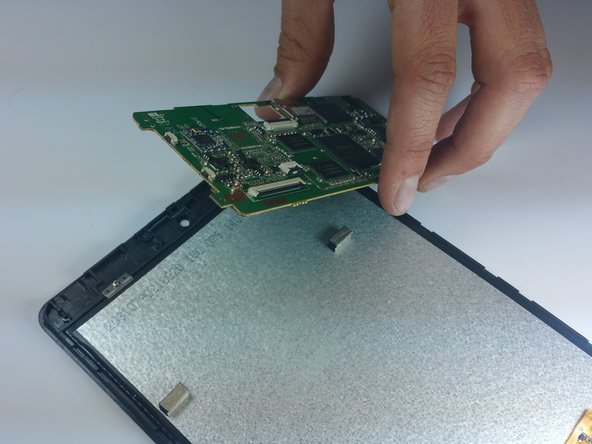
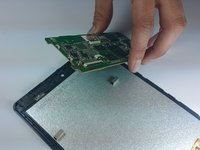
Til het moederbord voorzichtig van het apparaat en verwijder het.
-
-
-
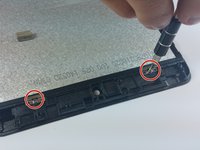
Verwijder de twee schroeven die de beugels op hun plek houden.
-
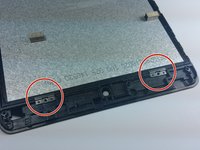
Verwijder de twee zilveren beugels die het scherm op zijn plek houden.
-
-
-
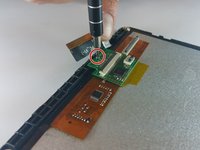
Verwijder de ene zilveren schroef op de kleine groene printplaat aan de onderkant van het apparaat.
-
Leg de kleine printplaat voor nu opzij.
-
-
-
Verwijder de twee zilveren schroeven aan de onderkant van het apparaat.
-
-
-
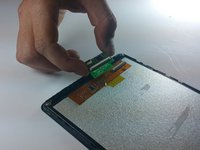
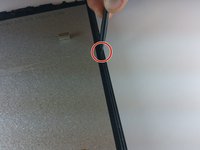
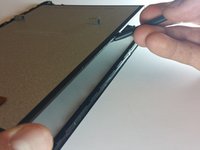
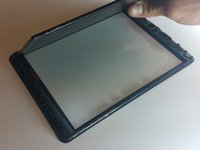
Leg het apparaat met het scherm naar beneden en gebruik een spudger om het scherm aan de rechterkant van het glas los te wippen.
-
-
-














Volg deze instructies in omgekeerde volgorde om je apparaat weer in elkaar te zetten.
Annuleren: ik heb deze handleiding niet afgemaakt.
12 andere personen hebben deze handleiding voltooid.

Team

Colorado Springs, Team 5-1, Panko Spring 2015 Lid van Colorado Springs, Team 5-1, Panko Spring 2015
UCCS-PANKO-S15S5G1
3 Leden
60 handleidingen geschreven
6Gids Commentaar
Thank you for this!
Ok thanks for the guide very helpful. Where can I pick a glass up at? And what's the going price?
My repair kit has specifically the touch glass meaning i need to separate the glass form the frame, how do you do this?
I just found the frame can be separated from the glass with a spudger-type thing, I used a fine blade like a craft knife (be careful!!). started at the bottom inside end and worked my way around, trying not to damage the frame in the process. Just to clarify this is for the NX785QC8G.
The glass is attached to the frame with adhesive, so the new glass will need to be stuck back on in a similar way. It’s strange that this part wasn’t mentioned in the instructions, as it was supposed to be for replacing the actual glass digitiser screen, but didn’t quite get there… hope this is of some help.. although it’s 2021 now and you’ve probably gone and bought a new one lol ;) I love my tablet (well, my 4yr-old does) but I stood on it and I happened to have a digitiser on hand.
