Deze vertaling is door een computer gegenereerd en is nog niet door iemand nagekeken. Spreek je deze taal? Bekijk het hier.
Inleiding
De Nest Cam beschikt ook over een luisterfunctie. De microfoonkabel is verantwoordelijk voor de geluidsopname. Als het geluid van je Nest Cam niet wordt verzonden, gedempt klinkt of zelfs onverstaanbaar is, moet de microfoonkabel mogelijk worden vervangen.
Wat je nodig hebt
-
-
-
Verwijder de vier 6 mm schroeven uit het achterpaneel met de J000 kruiskopschroevendraaier.
 Vraag FixBot
-
-
-
Gereedschap gebruikt in deze stap:Tweezers$4.99
-
Open het achterpaneel volledig om de binnenkant van de Nest Cam bloot te leggen.
-
Gebruik de pincet om de rode en zwarte microfoonkabel los te koppelen van het moederbord.
-
-
-
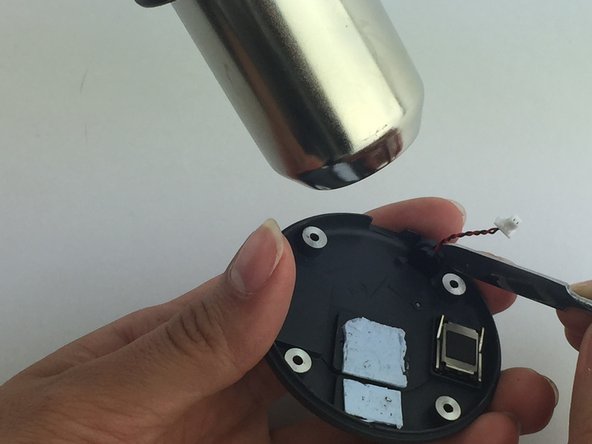
Houd het achterpaneel stevig vast en gebruik een spudger om het kleine plastic paneel dat de microfoonkabel op zijn plaats houdt los te wrikken.
-
Gebruik een heteluchtpistool om de lijm die de microfoonkabel op zijn plaats houdt te smelten en verwijder deze vervolgens.
-
-


Volg deze instructies in omgekeerde volgorde om je apparaat weer in elkaar te zetten.
Annuleren: ik heb deze handleiding niet afgemaakt.
Één andere persoon heeft deze handleiding voltooid.

Team

USF Tampa, Team 1-1, Leahy Spring 2016 Lid van USF Tampa, Team 1-1, Leahy Spring 2016
USFT-LEAHY-S16S1G1
7 Leden
60 handleidingen geschreven
3Gids Commentaar
Thank you for this look inside the device. In the Nest settings there is a way to turn off the microphone, but anyone with access can turn it back on. I'm going to use this guide to unplug the microphone and permanently (but reversibly) disable it.
Yes, by accessing the settings either via the app, or the website. Device options will all you to control the mic recording, or notifications if you just don't want to know when it picks up audio. Each app has its own settings on my devices, I think, but don't quote me on that one.
