Ga door naar hoofdinhoud
Word lid van de reparatiegemeenschap - Account aanmaken

Neato Botvac 80 Battery Replacement

Wat je nodig hebt

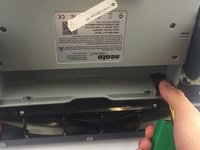
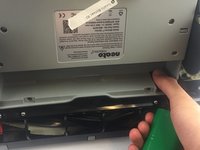
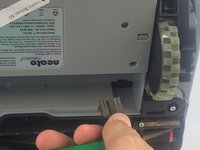
    1. Neato Botvac 80 Battery Replacement, Loosening screws: stap 1, afbeelding 1 van 3 Neato Botvac 80 Battery Replacement, Loosening screws: stap 1, afbeelding 2 van 3 Neato Botvac 80 Battery Replacement, Loosening screws: stap 1, afbeelding 3 van 3
      • First, open the bin compartment and flip the switch to the off position.

      • Once you have done this, flip the robot over. Loosen the 2 screws, and lift the flap off

      • You will need to remove the 22.5mm bolts with a J1 Torx screwdriver.

      • Screws cannot be removed from the cover.

      Vraag FixBot

      Voeg opmerking toe

    2. Neato Botvac 80 Battery Replacement, Remove battery cover: stap 2, afbeelding 1 van 2 Neato Botvac 80 Battery Replacement, Remove battery cover: stap 2, afbeelding 2 van 2
      • Gently lift to remove battery cover.

      Vraag FixBot

      Voeg opmerking toe

    3. Neato Botvac 80 Battery Replacement, Removing battery: stap 3, afbeelding 1 van 3 Neato Botvac 80 Battery Replacement, Removing battery: stap 3, afbeelding 2 van 3 Neato Botvac 80 Battery Replacement, Removing battery: stap 3, afbeelding 3 van 3
      • Locate battery clip.

      • Press down on latch with thumb and slide clip back.

      • Remove the battery.

      Vraag FixBot

      Voeg opmerking toe

Conclusie

To reassemble your device, follow these instructions in reverse order.

Annuleren: ik heb deze handleiding niet afgemaakt.

Één andere persoon heeft deze handleiding voltooid.

Alexander Silfa

Lid sinds: 02/02/17

300 Reputatie

1 Handleiding geschreven

Team

USF Tampa, Team 17-5, Blackwell Spring 2017 Lid van USF Tampa, Team 17-5, Blackwell Spring 2017

USFT-BLACKWELL-S17S17G5

3 Leden

18 handleidingen geschreven

0Gids Commentaar

Voeg opmerking toe

Weergavestatistieken:

Afgelopen 24 uren: 1

Afgelopen 7 dagen: 1

Afgelopen 30 dagen: 20

Altijd: 5,654