Ga door naar hoofdinhoud
Word lid van de reparatiegemeenschap - Account aanmaken

NABI XD Battery Replacement

Wat je nodig hebt

    1. NABI XD Battery Replacement, Rear panel: stap 1, afbeelding 1 van 2 NABI XD Battery Replacement, Rear panel: stap 1, afbeelding 2 van 2
      • Use the plastic opening tool at the top left corner seam, then pry the corner apart.

      Vraag FixBot

      Voeg opmerking toe

    2. NABI XD Battery Replacement: stap 2, afbeelding 1 van 1
      • Next slide the plastic opening tool across the sides of the Nabi. It will slowly open.

      • There are small plastic clips that need to be release. Gently apply outwards pressure until the clips give.

      • Go around the NABI XD and separate the rear panel from the device.

      Vraag FixBot

      Voeg opmerking toe

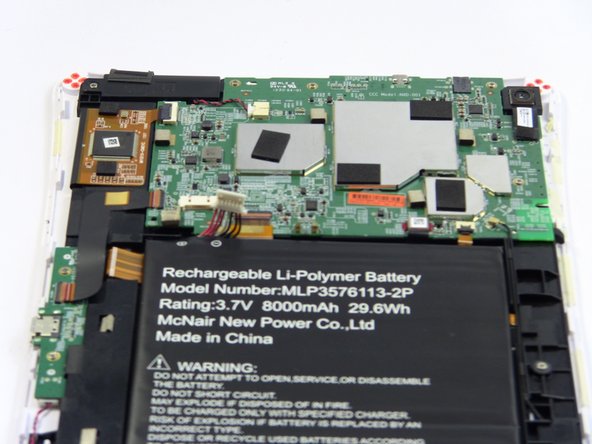
    1. NABI XD Battery Replacement, Battery: stap 3, afbeelding 1 van 2 NABI XD Battery Replacement, Battery: stap 3, afbeelding 2 van 2
      • Place your fingernails on both sides of the connector and pull it straight back away from the holder.

      Vraag FixBot

      Voeg opmerking toe

    2. NABI XD Battery Replacement: stap 4, afbeelding 1 van 1
      • Battery is glued to the base, lift carefully.

      • To remove battery, lift the battery up from the motherboard.

      Vraag FixBot

      Voeg opmerking toe

Conclusie

To reassemble your device, follow these instructions in reverse order.

Annuleren: ik heb deze handleiding niet afgemaakt.

Marissa Schiereck

Lid sinds: 09/15/16

638 Reputatie

6 handleidingen geschreven

Team

USF Tampa, Team 17-2, Blackwell Fall 2016 Lid van USF Tampa, Team 17-2, Blackwell Fall 2016

USFT-BLACKWELL-F16S17G2

3 Leden

12 handleidingen geschreven

1Gids Commentaar

Where can you get the battery?

Dave - Antwoord Deel

Voeg opmerking toe

Weergavestatistieken:

Afgelopen 24 uren: 1

Afgelopen 7 dagen: 5

Afgelopen 30 dagen: 31

Altijd: 1,159