Ga door naar hoofdinhoud
Word lid van de reparatiegemeenschap - Account aanmaken

Motorola i850 Battery Replacement

    1. Motorola i850 Battery Replacement, Disassembling Motorola i850 Back Cover: stap 1, afbeelding 1 van 1
      • Use your thumb to slide the back cover locker away from the antenna.

      Vraag FixBot

      Voeg opmerking toe

    2. Motorola i850 Battery Replacement: stap 2, afbeelding 1 van 2 Motorola i850 Battery Replacement: stap 2, afbeelding 2 van 2
      • Slide the back cover towards the antenna while lifting the cover away from the phone.

      Vraag FixBot

      Voeg opmerking toe

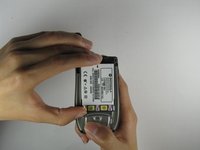
    1. Motorola i850 Battery Replacement, Battery: stap 3, afbeelding 1 van 1
      • Place your thumb on the indicated corner while stabilizing the phone and the upper portion of the battery with your forefinger.

      Vraag FixBot

      Voeg opmerking toe

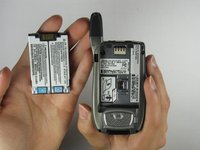
    2. Motorola i850 Battery Replacement: stap 4, afbeelding 1 van 2 Motorola i850 Battery Replacement: stap 4, afbeelding 2 van 2
      • Lift the battery out of the phone while pushing it towards the antenna.

      Vraag FixBot

      Voeg opmerking toe

Conclusie

To reassemble your device, follow these instructions in reverse order.

Annuleren: ik heb deze handleiding niet afgemaakt.

Alex Jones

Lid sinds: 04/09/10

1 Reputatie

3 handleidingen geschreven

Team

Cal Poly, Team 34-56, Forte Spring 2010 Lid van Cal Poly, Team 34-56, Forte Spring 2010

CPSU-FORTE-S10S34G56

4 Leden

56 handleidingen geschreven

1Gids Commentaar

Motorola i850

Hussain Baloch - Antwoord Deel

Voeg opmerking toe

Weergavestatistieken:

Afgelopen 24 uren: 3

Afgelopen 7 dagen: 8

Afgelopen 30 dagen: 37

Altijd: 2,013