Ga door naar hoofdinhoud
Word lid van de reparatiegemeenschap - Account aanmaken

Motorola i560 Keypad Replacement

Wat je nodig hebt

  1. Motorola i560 Keypad Replacement, Battery: stap 1, afbeelding 1 van 1
    • Place thumb on the rubber tab on the lower back of the phone.

    • Push away from the phone to release back panel.

    Vraag FixBot

    Voeg opmerking toe

  2. Motorola i560 Keypad Replacement: stap 2, afbeelding 1 van 1
    • Lift the back panel of the phone to expose battery (not shown here).

    Vraag FixBot

    Voeg opmerking toe

  3. Motorola i560 Keypad Replacement, Motherboard: stap 3, afbeelding 1 van 1
    • Pull the antenna up to reveal two of the six screws.

    Vraag FixBot

    Voeg opmerking toe

  4. Motorola i560 Keypad Replacement: stap 4, afbeelding 1 van 1
    • Unscrew all six screws on the back side of the phone using a T-6 bit.

    Vraag FixBot

    Voeg opmerking toe

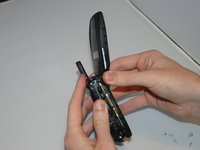
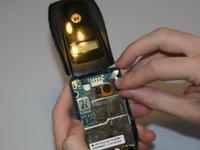
  5. Motorola i560 Keypad Replacement: stap 5, afbeelding 1 van 2 Motorola i560 Keypad Replacement: stap 5, afbeelding 2 van 2
    • Gently separate the front and back sides of the phone, as shown in the picture.

    • Be careful not to break or bend the ribbon cables.

    Vraag FixBot

    Voeg opmerking toe

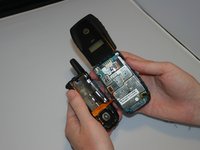
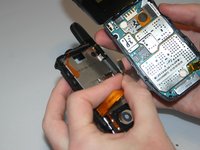
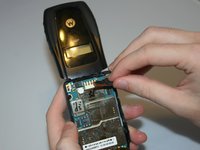
  6. Motorola i560 Keypad Replacement: stap 6, afbeelding 1 van 2 Motorola i560 Keypad Replacement: stap 6, afbeelding 2 van 2
    • Detach the first ribbon cable by unplugging it from the motherboard.

    Vraag FixBot

    Voeg opmerking toe

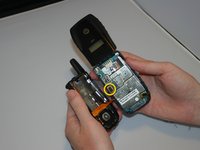
  7. Motorola i560 Keypad Replacement: stap 7, afbeelding 1 van 2 Motorola i560 Keypad Replacement: stap 7, afbeelding 2 van 2
    • Detach the speaker ribbon cable from the motherboard.

    Vraag FixBot

    Voeg opmerking toe

  8. Motorola i560 Keypad Replacement: stap 8, afbeelding 1 van 1
    • Remove the motherboard from the front half of the phone by gently shaking it loose. It should come out with little to no trouble.

    Vraag FixBot

    Voeg opmerking toe

  9. Motorola i560 Keypad Replacement, Keypad: stap 9, afbeelding 1 van 1
    • Push lightly from the front of the keypad to remove it.

    Vraag FixBot

    Voeg opmerking toe

Conclusie

To reassemble your device, follow these instructions in reverse order.

Annuleren: ik heb deze handleiding niet afgemaakt.

Één andere persoon heeft deze handleiding voltooid.

Haley S

Lid sinds: 03/11/13

10 Reputatie

4 handleidingen geschreven

Team

Clemson, Team 13-6, Benson Spring 2013 Lid van Clemson, Team 13-6, Benson Spring 2013

CLEM-BENSON-S13S13G6

3 Leden

10 handleidingen geschreven

0Gids Commentaar

Voeg opmerking toe

Weergavestatistieken:

Afgelopen 24 uren: 2

Afgelopen 7 dagen: 3

Afgelopen 30 dagen: 23

Altijd: 349